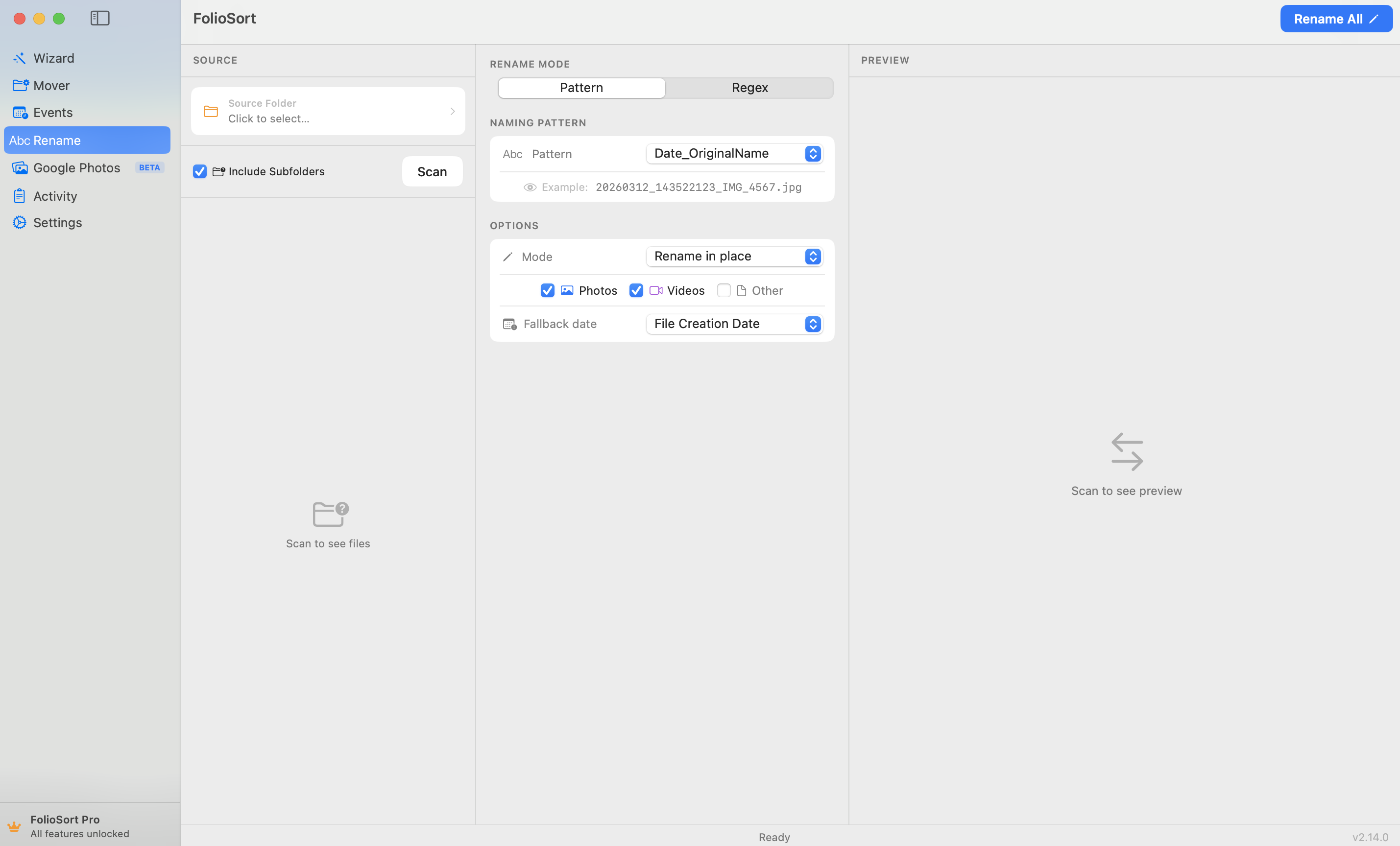
El módulo Rename
El módulo Rename lee los metadatos EXIF de cada archivo y lo renombra exactamente como especifiques. Usa tokens simples, escribe patrones regex con grupos de captura, o elige entre 7 estrategias de nombrado ya construidas. Una vista previa en vivo muestra cada resultado antes de tocar un solo archivo.
IMG_0001 no te dice nada sobre la foto.Cada cámara y teléfono genera los mismos nombres sin sentido — IMG_4523.jpg,
DSC00218, PXL_20260503 — así que una carpeta de mil fotos es un muro de números
que no puedes buscar, ordenar ni hojear. Renombrarlas a mano es una tarde perdida; si te equivocas en una,
no hay vuelta atrás.
Aun así, cada archivo ya sabe exactamente cuándo y cómo se tomó. Esa información está sin leer dentro del EXIF, esperando a convertirse en un nombre de archivo que realmente signifique algo.
El módulo Rename lee el EXIF de cada archivo y construye el nombre que tú
defines: la fecha de captura, tokens de cámara como {Camera} o {Lens}, un
contador que se incrementa automáticamente, un prefijo o sufijo — o un regex completo con grupos de
captura. Elige una estrategia, mira la vista previa en vivo, ejecútalo.
Soporta más de 50 formatos — JPEG, HEIC, vídeo y RAW — actualiza un recuento de coincidencias en vivo mientras escribes, y cada lote se puede deshacer por completo. Miles de archivos renombrados mientras te tomas el café.
Cómo funciona
Elige la carpeta, disco o tarjeta SD a renombrar — mezcla cámaras, teléfonos y formatos libremente.
Fecha EXIF, tokens de cámara, contador secuencial, prefijo/sufijo — o un regex completo con grupos de captura.
Ve el antes → después de cada archivo y un recuento de coincidencias en vivo. Nada se renombra hasta que estés conforme.
Ejecútalo en el sitio, o copia-y-renombra a un nuevo destino dejando los originales intactos. Deshacer completo, un clic.
Qué hace
2026-05-03_143022.jpg o 2026-05_wedding.jpg. Separadores personalizados, precisión horaria y orden de fecha.{Camera}, {Lens}, {ISO}, {Aperture} y {ShutterSpeed} en los patrones — ideal para identificar el cuerpo en sesiones con varias cámaras.$1, $2. Convierte IMG_4523.jpg en 4523_holiday.jpg. La validación de referencias inversas detecta grupos incorrectos primero.holiday_001.jpg, holiday_002.jpg. Controla el número inicial, el relleno y el paso; reinicia por carpeta o continúa sin parar.Vista previa primero
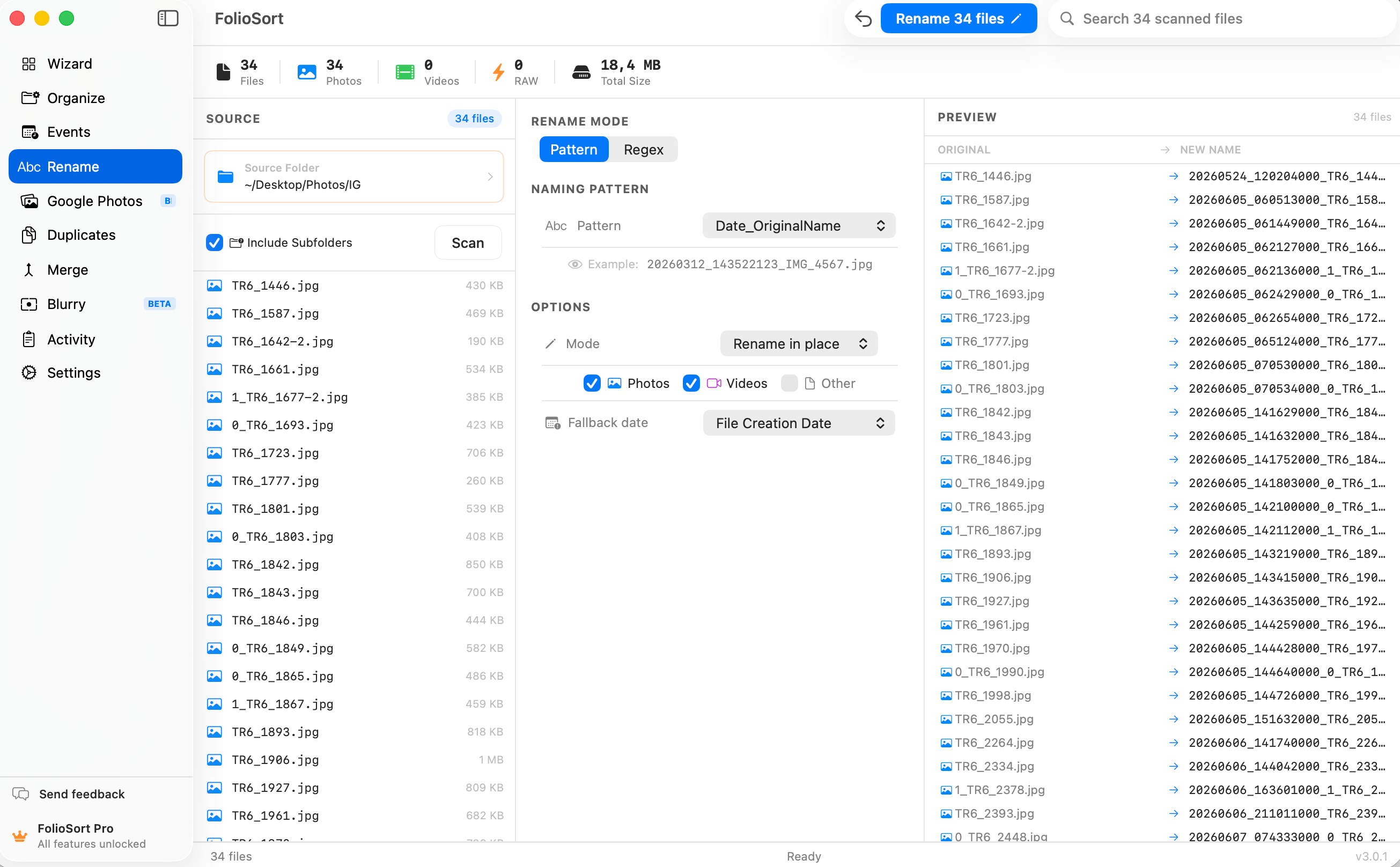
El renombrado con regex te da buscar-y-reemplazar con referencias a grupos de captura —
$1, $2 — y un recuento de coincidencias que se actualiza en vivo mientras
escribes, así que ves exactamente a cuántos archivos afectará un patrón antes de confirmar.
La validación de referencias inversas detecta una referencia a un grupo que no existe y bloquea la ejecución, y una barra de estadísticas en vivo muestra totales mientras configuras — nunca renombras a ciegas.
Renombrar miles de archivos es delicado, así que cada lote se puede deshacer por completo con un clic — revierte toda una ejecución si el patrón no era lo que querías.
¿Prefieres conservar los originales? El modo copiar y renombrar escribe copias renombradas en un nuevo destino y nunca toca el origen. Y todo funciona 100% en el dispositivo: sin nube, sin cuenta, sin subir nunca tu biblioteca.
Entrego galerías a clientes y los nombres IMG_ siempre parecían amateur. Construí un
patrón de fecha y luego contador, previsualicé toda la sesión, y renombré 900 archivos de una sola vez — con
una copia para que mis originales quedaran intactos. La vista previa en vivo hace que nunca adivine lo que
estoy a punto de hacer.
Rename trabaja de la mano con el Organizador de FolioSort. Ordena por fecha real de captura y cámara, geocodifica por lugar, y renombra en lote — construye el archivo exacto que necesita tu flujo de trabajo.
Ordena en lote decenas de miles de fotos y vídeos por fecha EXIF, cámara y plantillas de carpeta.
Explorar el Organizador → Se combina conGeocodifica el GPS de forma inversa en carpetas de ciudad y país — en el dispositivo, en carpetas reales.
Explorar Ubicación →Renombra miles de archivos por fecha, cámara, contador o regex — con vista previa en vivo.
Esta páginaFAQ
Sí — Rename es gratis para empezar, con nombrado por fecha EXIF, tokens de cámara, secuencial y prefijo/sufijo, además de vista previa en vivo y deshacer completo. Regex con grupos de captura y patrones avanzados son una función Pro. Pro es un pago único de 19,99 €, sin suscripción.
Sí. FolioSort muestra una vista previa en vivo de antes → después para cada archivo de la lista, y un recuento de coincidencias se actualiza mientras escribes un patrón o regex. Nada se renombra hasta que pulsas Iniciar, así que siempre ves el resultado exacto primero.
Sí. Lee los metadatos EXIF incrustados en cada archivo — fecha y hora de captura, marca y modelo de cámara, objetivo, ISO, apertura y velocidad de obturación — y puede construir nombres de archivo a partir de esos valores reales usando tokens como la fecha de captura o {Camera}. Funciona con JPEG, HEIC, vídeo y más de 50 formatos RAW.
Sí. Cada lote de renombrado queda registrado y es reversible con un clic, así que puedes revertir toda una ejecución si un patrón no era lo que querías. También hay un modo copiar y renombrar que escribe copias renombradas en un nuevo destino y deja tus originales completamente intactos.
Escribe un patrón de búsqueda y un reemplazo usando referencias a grupos de captura como $1 y $2. Convierte IMG_4523.jpg en 4523_holiday.jpg con un solo regex, con el recuento de coincidencias actualizándose mientras escribes. La validación de referencias inversas detecta referencias a grupos inexistentes antes de renombrar cualquier archivo. Regex es una función Pro.
FolioSort es gratis para empezar. Elige una estrategia de nombrado, previsualiza cada resultado, y deja que Rename convierta un muro de números de cámara en nombres de archivo que puedes leer de verdad — totalmente deshacible, nunca subido. Regex y patrones avanzados vienen con Pro.