Blurry
For anyone sitting on thousands of photos where a third are soft, shaken or missed-focus throwaways — FolioSort surfaces the blurriest first, lets you set the cut-off with a single slider, and clears them out without touching the keepers.
Burst mode fires twelve frames; you keep all twelve. The toddler moved, the dog blurred, the hand shook — but the soft frames stay in the library because culling them one by one is mind-numbing. Over years, a third of a library can be out-of-focus dead weight, padding your backups and burying the keepers.
Existing tools don't help. Your photo app sorts by date, not sharpness. There's no "show me the blurry ones" button anywhere. So the soft shots stay — invisible, un-cullable, multiplying.
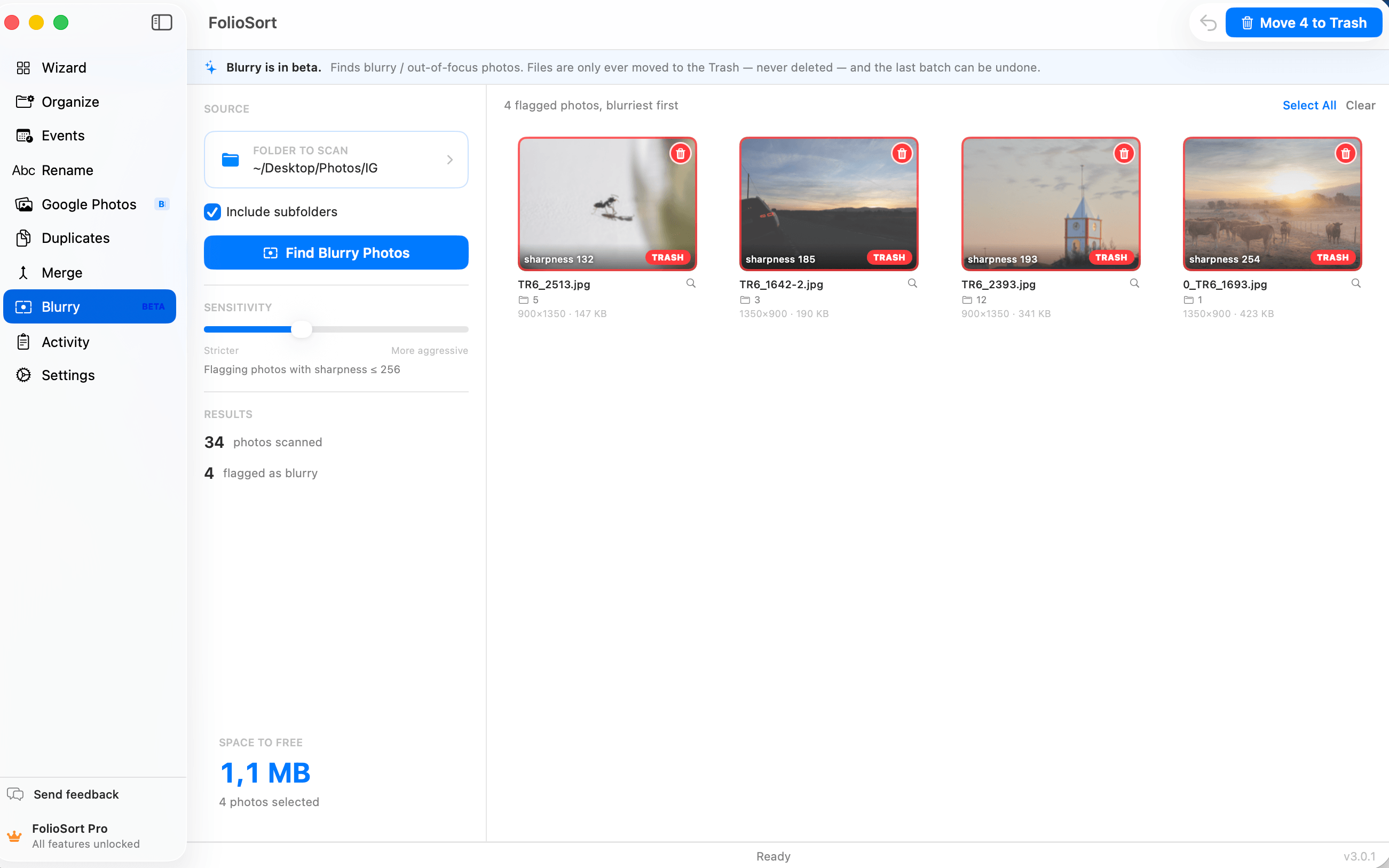
Blurry scores every photo for sharpness and sorts them blurriest-first, so the worst offenders are right at the top where you can clear them in seconds.
And it asks the right question. A portrait with a tack-sharp face on a melted background is mostly soft, so any measure that averages the whole frame calls it blurry — the single biggest false positive there is. FolioSort scores the frame in tiles and judges it on its sharpest region: is the part that was meant to be sharp, sharp? Your bokeh portraits and macro shots stop being flagged, while a genuinely soft frame scores exactly as badly as before.
Where you draw the line is still yours. A live sensitivity slider sets the cut-off and the selection updates instantly, with each photo's score shown so you can calibrate by eye.
It runs entirely on-device with no machine-learning black box: a fast, transparent sharpness measure that's consistent across resolutions, so a 50-megapixel RAW and a phone snap are judged on the same scale.
How it works
Choose a folder to scan.
FolioSort measures the sharpness of every photo and sorts them blurriest-first.
Drag the sensitivity slider; the flagged set re-filters live — no re-scan. Each photo shows its score, filename, folder and resolution.
Send the blurry shots you've confirmed to the Recycle Bin or Trash — with undo.
Why it's safe
Burst mode means I have thousands of near-identical soft frames I'll never look at. FolioSort lined up the blurriest ones first, I slid the threshold until it matched my eye, and cleared a couple of thousand junk frames in ten minutes. The bokeh portraits I was worried about? It left them alone because I could see the scores.
FolioSort doesn't just sort your photos — it cleans them up. Merge brings every scattered copy together; Duplicates removes the copies merging exposes; Blurry clears the shots you'd never keep.
Collapse every scattered copy of your library into one clean, de-duplicated archive.
Explore Merge → ThenFind exact and visually similar copies — even resized and re-edited ones — and reclaim the space.
Explore Duplicates →Score every shot for sharpness, surface the blurriest first, and clear the throwaways.
This pageFAQ
Almost certainly not, and not just because you control the slider. A frame is scored in tiles and judged on its sharpest region, so a portrait with a tack-sharp face on a soft background reads as sharp — which is what it is. A measure that averaged the whole frame would call it blurry, and that was the dominant false positive before this changed. On top of that, the sensitivity slider lets you set the cut-off yourself and every photo shows its score, so you can always see why something was flagged.
No. Blurry is ML-free by design. It uses a fast, transparent sharpness measure that runs entirely on-device — no cloud, no machine-learning black box — and shows you the score for every photo so you're never trusting a hidden verdict.
Yes. The sharpness score is resolution-independent, so a 50-megapixel RAW and a phone snapshot are judged on the same scale.
They go to your system Recycle Bin or Trash, and the operation is undoable. Nothing leaves your machine and nothing is unrecoverable. The slider is deliberately conservative by default — FolioSort under-flags rather than over-flags, because deleting is destructive.
Scanning, scoring and the sensitivity slider are free and unlimited — every photo shows its sharpness score. On the free plan you can clear 20 soft photos in total; Pro removes the limit for a one-time €19.99, with a 14-day money-back guarantee. No subscription, no account.
Point FolioSort at your folder, slide the threshold until it matches your eye, and clear years of soft, shaky throwaways in minutes — with undo, and your keepers untouched.