All features
Every FolioSort feature — matched to what's actually wrong with your library
FolioSort 5 is the app you keep your photo library in: it browses, organizes, cleans, searches, tags and protects the folders you already have, on every drive, without importing them. Not a menu to study: tell us the symptom below, or filter the list until only the ones you need are left. Everything here runs on your own Mac or PC — no upload, no account, no subscription.
Start here
Which of these is your Saturday afternoon?
Nine sentences we hear constantly. Pick the one that stings and go straight to the fix — the rest of this page can wait.
39 of 39
Nothing matches that. Try a plainer word — dates, faces, RAW, Google, rename — or .
Browse
New in FolioSort 5: the app opens on your whole library, on every drive, straight from your folders — FolioSort shows them where they are; it doesn't import them.
Library
FreeHome, Timeline, Map, People, Events and Places over every folder on every drive, nothing imported — and an unplugged drive stays visible as greyed tiles until it comes back.
Library in numbers
FreeSpace used, share of RAW, top camera, busiest day, the hour you shoot most — every number opens the photos it counts, and the share card is made on your computer.
Organize
Every photo already knows when, where and on what it was taken. These modules turn that metadata into folders.
The Organizer
ProPoint it at the pile, pick a folder template, and watch ten thousand files land where they belong — previewed first, undoable after.
Organize by date
ProSorts by the date the camera wrote at the moment of capture — not the day your computer last touched
the file. {YYYY}/{MM} and it's done.
Organize by location
ProTurns the GPS coordinates inside your photos into real place names, then files each shot under
Country/City. Only the coordinates leave the machine, never the photo.
RAW photo sorting
ProCR3, NEF, ARW, RAF and twenty-odd more, read straight off the card — plus BRAW and R3D cinema files. No conversion, no import catalog.
Mass rename
ProTurn IMG_4471.JPG into 2024-07-13_Lisbon_0142.JPG — EXIF tokens, regex
capture groups, seven strategies, live preview of every line.
Merge libraries
ProFour drives of half-overlapping copies collapse into one clean archive. The best copy is kept, the originals are never deleted for you.
File-type filter
ProTake only the JPEGs. Or only the RAWs. Or everything but the videos. Pick from the types your scan actually found — with counts and sizes.
Events
ProA trip, a wedding, a tournament — grouped into its own folder by the time window it happened in, across every camera that was there.
Time-block sorting
ProGetting Ready, Ceremony, Reception. Define the blocks once and every shooter's files route themselves into the right act of the day.
Get Started Wizard
FreeDon't know which module you need? Say what you want to happen and the wizard assembles the run for you. No manual, no vocabulary to learn.
Two files, one name
FreeWhen a file lands where another already has its name, both are shown side by side — thumbnail, date taken, pixel size, file size, folder — with Keep Both as the default.
Clean
Years of dumps hide gigabytes of clutter. FolioSort finds it and shows you — nothing is ever removed without your click.
Duplicate finder
ProByte-identical copies by checksum, plus the resized and re-edited near-twins most tools walk straight past. You choose which copy survives.
Blurry photo cleanup
ProEvery frame scored for sharpness, blurriest first, with a live slider for the cut-off. Sharp keepers are never touched.
Screenshot cleanup
ProDetected by content, missing camera data, format and aspect ratio — not just a filename. Clears the screenshot pile out of your real photos.
Best Shots
EliteTen near-identical frames go in, one keeper comes out — scored for sharpness, faces and open eyes. You approve every single call.
Keyboard culling
EliteNine hundred frames, one key each: keep, reject, one to five stars, a colour label. The ratings are written into the photos, so Lightroom and Capture One already know your picks.
Find
The same class of AI the cloud services run on their servers — running privately on yours, with the Wi-Fi switched off.
AI photo search
EliteDescribe the photo — "kids at the beach", a receipt's wording, a place and a month — and it surfaces. No tags, no captions, no upload.
Find a Person
EliteAdd a couple of photos of someone and FolioSort finds every other one, across twenty years and any folder. Not a single face is uploaded.
Auto Find People
EliteNo example photo needed: every face in your folders is grouped into people automatically. Name them once, then browse a whole life by person.
People into XMP
EliteWrites the names into .xmp sidecars beside your files, so Capture One, Lightroom and
digiKam can search your RAW library by person. Originals untouched.
Tag & Fix
New in FolioSort 5: correct what the files say about themselves, in the fields every other app reads — and undo it if you change your mind.
AI Tags
EliteProposes keywords from a 303-tag vocabulary on the device, you review them as photo cards, and the ones you keep are written into XMP and IPTC — a sidecar for RAW. Undo removes only what it added.
Places
ProTurns each photo's GPS into city, state and country and writes them into IPTC and XMP, where Lightroom, Bridge and Apple Photos read them. Undo restores exactly what was there.
Dates
ProFills in missing dates from the file name, folder or neighbouring photos, shifts a camera whose clock was wrong, and sets a date — even just a year — on scanned prints.
Protect
New in FolioSort 5: know that the library and its backup are complete, and repair them when they are not.
Backup Copy
ProMirrors the library to another drive with the same folders, re-reads and hash-checks every copy, and copies only what changed on later runs. Nothing on the backup is ever deleted.
Archive Health
ProFlags every file as intact, modified, corrupted, missing or new — including silent bit rot, where the content changed but the size and date did not — and restores it from the verified backup.
Own
Getting out of the cloud usually means a broken export. These are the tools that make the archive on your disk the real one.
Google Takeout import
FreeReads Google's JSON sidecars and puts the real capture dates and GPS back into your photos before sorting them. The step every other guide skips.
The Exit Kit
ProDetects what kind of export you dropped in — Google, WhatsApp, iCloud — repairs it, de-duplicates it and sorts it into a verified archive you own.
Data safety by design
FreeCopy-first, checksum-verified with XXHash64 or SHA-256, deletions to the Trash and never past it, and fifty batches of undo that survive a restart.
NAS & self-hosting
FreeSynology, QNAP, SMB and AFP shares, iCloud Drive with auto-download, and folder structures Immich and Synology Photos index natively.
Migration guides
FreeStep-by-step routes out of Google Photos to a Mac, a PC, a Synology, Immich, iCloud, Nextcloud or S3 — written for the export you actually get.
91 supported formats
FreeForty-six everyday photo and video formats free, forty-five RAW and cinema formats with Pro. The full table, kept in sync with the app.
Automate
Set it up once, then stop thinking about it. Same checksums, same undo history, same activity log on every unattended run.
Workflows
EliteImport, organize, rename, de-duplicate, cull — your whole ritual saved as one button, with a review pause anywhere you want one.
Smart Folders
EliteSave an AI search — "the dog on the beach" — as a real folder on disk that keeps refilling itself as you import. Your originals never move.
Takeout Auto-Sync
EliteGoogle keeps delivering scheduled exports; FolioSort watches the folder, waits for multi-part downloads to finish, and merges only what's new.
Labs
New in FolioSort 5: small tools customers asked for. Each says what it does to disk before it runs, image tools write new copies, and every run can be undone.
Bulk Crop
ProSet one crop and apply it to every photo of the same size, written as new copies — the originals stay as they are.
Combine Photos
ProSeveral photos or screenshots into one tall image, side by side, a grid, a PDF or a contact sheet.
Moved Files Map
ProA CSV of where every moved file went, for Lightroom or any catalog that lost track of them. It only reads.
Not a mockup
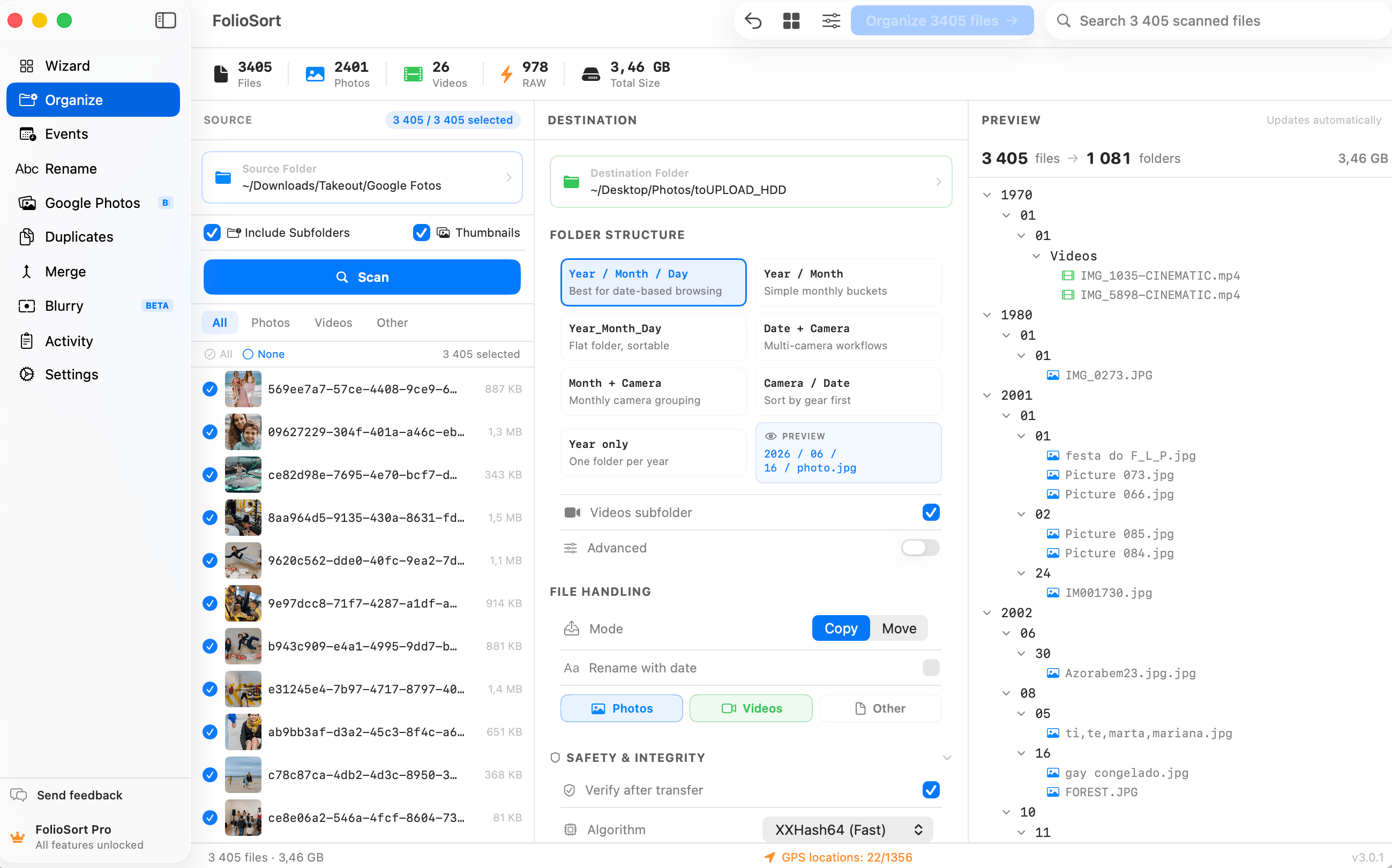
This is what those modules actually look like
Real screenshots from the shipping app on macOS. Nothing here is a rendering, and nothing here needs an internet connection to run.
What the badges mean
Try every feature first. Pay once, if you decide to.
There is no trial clock and no card up front. Free is a real tool with real limits — the badge on each card tells you which licence removes them.
€0
Genuinely free, not a demo.
- Google Takeout import — no limit, forever
- Organize, rename, merge — 100 files a batch
- Library browsing on every drive — no limit
- Your first 20 cleanup actions
- AI tasters on a sample of your library
€19.99 once
The unlimited organizer, on one computer.
- Organize, duplicate, blurry and screenshot cleanup, unlimited
- 45 RAW and cinema formats
- GPS geocoding, unlimited
- Backup Copy, Archive Health, Places and Dates
- Free updates — no expiry, no subscription
€29.99 once
Everything, plus every neural network.
- AI search, faces and OCR across the whole library
- AI Tags written into your files
- Best Shots culling and Smart Folders
- Workflows and Watch Folders automation
- 3 devices — Mac and Windows on one key
One-time payments, never a subscription. 14-day refund, no reason required — full comparison table on the pricing page.
FAQ
Before you pick a feature
Which FolioSort features are free?
Every feature can be tried without paying. Browsing the Library — every drive, the Timeline, Map, Events, Places and Library in numbers — is free and unlimited on every tier, and so are Google Takeout import and the Get Started Wizard. Organizing, renaming and merging run free up to 100 files per batch. Duplicate, blurry and screenshot cleanup give you your first 20 actions. Places writes up to 100 photos per scan and Dates up to 100 files per run, Backup Copy and Archive Health cover the first 100 files, AI Tags writes tags on 20 photos, and every Labs tool previews for free. AI search and face search come with a taster on a sample of your library. The badge on each card above shows which licence removes that limit.
What's the difference between Pro and Elite?
Pro is the unlimited organizer for one computer: organize by real EXIF date, rename, merge, undo, plus duplicate, blurry and screenshot cleanup, RAW support and geocoding — and, new in FolioSort 5, unlimited Places and Dates fixes, Backup Copy, Archive Health and saving from the Labs tools. Elite adds everything that runs a neural network — AI search across your whole library, AI Tags, Find a Person, Auto Find People and People in the Library, text-in-photo search, automatic events, AI culling and Smart Folders — plus Workflows and Watch Folders automation, a monthly Archive Health check with an HTML report, and use on 3 devices across Mac and Windows. Side-by-side table →
Do I need all of these features?
No — most people use two or three. The Organizer plus duplicate cleanup covers the classic case of a decade of photos on one messy drive. If you're leaving Google Photos, start with Takeout import instead. And if you'd rather not choose at all, the Get Started Wizard asks what you want to happen and builds the run for you.
Do any of these features send my photos to the cloud?
No photo ever leaves your computer. Every feature on this page — including AI search, AI Tags, face grouping and OCR — runs entirely on your own Mac or PC, and the AI models are downloaded once and then work with Wi-Fi off. The only things FolioSort sends are GPS coordinates when you ask for place names (to Apple on macOS, to OpenStreetMap on Windows), map tiles for the area on screen when the Library map is open, an update check, a one-time licence activation and anonymous usage events — never a photo, a face, a file name or a path. There's no account.
Can I undo what these features do to my files?
Yes. Every operation is copy-first and checksum-verified, deletions go to the system Trash rather than being erased, and FolioSort keeps a persistent undo history of up to 50 batch operations across sessions. Metadata writes — AI Tags, Places and Dates — keep their own undo history of the last 20 runs, and Backup Copy never deletes anything on the backup. Empty folders left behind are cleaned up when you revert — the whole design is documented on the data-safety page.
Do these features work on both Mac and Windows?
Yes. FolioSort runs on macOS 14 (Sonoma) or later and Windows 10 or later, with the same feature set on both. An Elite licence activates on up to 3 devices and you can mix Mac and Windows on one key; Pro covers one computer.
Where do I see what changed in the latest version?
FolioSort 5 is a free update for everyone who bought Pro or Elite. The changelog lists every release with the features it added. New modules also appear on this page as they ship, and the formats table is regenerated from the app on every release.
The fastest way to find your feature is to open the app.
Install it, point it at one messy folder, and let the Get Started Wizard pick the modules for you. Free, no account, and every operation is reversible — so the worst case is that you close it again.