AI Photo Search · Discovery
Type what you remember — "kids at the beach", "beach sunset in Faro", the words on a receipt, a place and a month — and FolioSort surfaces the matches, ranked, from your local library. Semantic meaning, text inside images, automatic events and recovered dates. It all runs on your device: no cloud, no account, no photo ever uploaded.
Somewhere in 40,000 files is the beach evening in Faro, the receipt you photographed for the warranty, the whiteboard from that meeting. But nothing is named for it, and scrolling for twenty minutes usually ends with you giving up.
The tools that can search by meaning want your whole library in the cloud and your photos run through someone else's AI — turning the pictures you'd never post into training data and account rows.
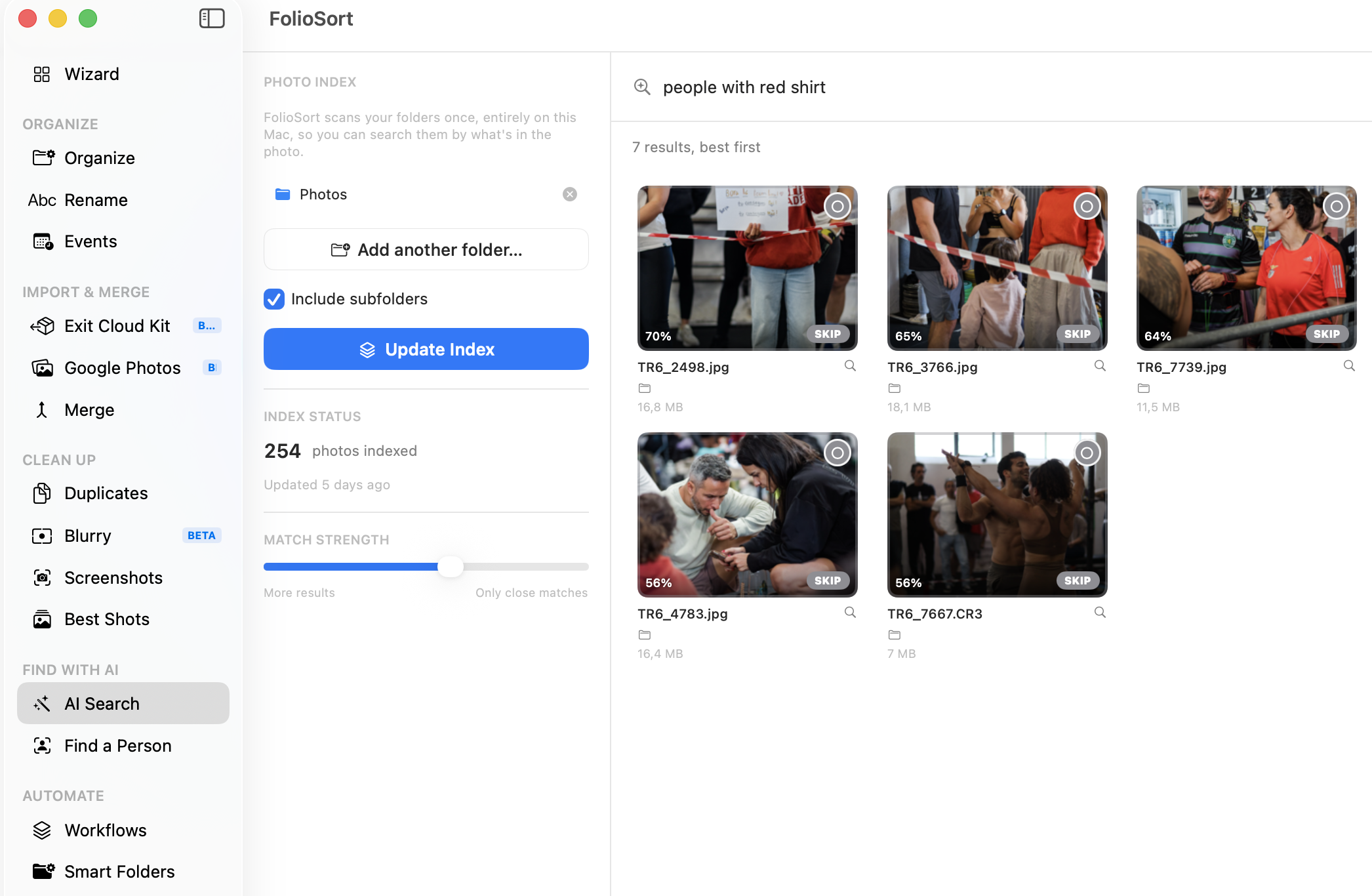
FolioSort's AI Photo Search understands what's in your photos. Type a description and an on-device MobileCLIP2-S2 model ranks your library by meaning; ask for a word and it reads the text printed inside images. It even proposes trips and events for you, and recovers dates that EXIF lost.
Every model, every index and every query runs locally. There's no upload, no account and no telemetry about what's in your photos — the same on-device AI that desktop tools charge €199–229 for, folded into the app that already organizes your library.
What's inside
How it works
Choose any folder — or your whole library — and FolioSort builds a local search index on your device.
Type what you remember: a scene, a place and a month, or a word printed inside the photo.
Matches come back ordered by relevance, each labelled with how confident the match is — in words, not a made-up percentage. Narrow to one indexed folder if you have a drive and its backup in there.
Open, shift-click a run of results, or turn a result set or an auto-event into a folder — copy, move, or send to the Trash. Always reversible.
Photos deleted outside FolioSort are swept out on every scan. Move a whole folder and you can point the index at its new home instead of re-reading it — hours, on a big drive. Clear or rebuild it from Settings whenever you want.
Conversational search · optional add-on
Compound questions are where keyword search gives up: "screenshots with an order confirmation", "photos with a QR code", "beach photos from August 2019". Conversational search handles them by connecting FolioSort to a local LLM you run — Ollama or LM Studio — on your own computer.
FolioSort translates your question into on-device searches over your local index. The language model only ever receives your typed question as text — never an image, never a thumbnail, never your library. Nothing is sent to a remote service.
It's part of Elite — bring your own local model and it plugs straight in.
Why it's private
I typed "beach sunset in Faro" and it pulled the exact evening out of eleven years of photos — no albums, no tags, nothing named. I'd looked at Excire, but paying $180 and importing everything into another app was a non-starter. This just searches the folders I already have, on my own laptop.
FolioSort's on-device Discovery runs entirely on your device. AI Photo Search finds any photo by meaning or text; Find a Person pulls every shot of someone out of the pile; Find Screenshots sweeps out what isn't really a photo.
Search your library in plain language — meaning, text, events and dates — entirely on-device.
This pageAdd a few reference photos and find every shot of that person in a folder — entirely on-device.
Explore Find a Person → DiscoverySpot the screenshots hiding among your real photos and clear them out in one pass.
Explore Find Screenshots →FAQ
No. Semantic search runs an on-device MobileCLIP model, text search uses on-device OCR, and the whole index is built and stored locally. No cloud, no account, and it works offline — no photo ever leaves your computer.
You don't need tags or filenames. Semantic search matches the meaning of what you type — "kids at the beach" finds the photos even if nothing is named that way. Text search reads the words printed inside an image, so you can find a receipt by what it says.
Conversational search is an Elite feature that lets you ask compound questions in plain language. It connects FolioSort to a local LLM you run yourself (Ollama or LM Studio). The model only ever sees your typed question as text — never your photos. Nothing is sent to a remote service.
English, Portuguese, Spanish, French and German. Matching is accent-insensitive, so "fatura" finds "Fatura".
Yes. The model that matches meaning was trained in English, so a query in Portuguese, Spanish, French or German is translated on your own machine before it is matched — which recovers the English accuracy instead of quietly handing you worse results. The words you actually typed are still what the text search looks for, so "recibo" keeps finding Portuguese receipts. If translation is unavailable, the query runs untranslated rather than failing.
Yes. Pick one indexed folder instead of all of them. This matters if you have indexed a drive and its backup: without it, every result comes back twice. You can also choose whether a query is about what a photo shows, what it says, or both — the two are no longer blended with no way to separate them.
Photos deleted outside FolioSort are swept out of the index on every scan, so results never point at files that are gone. If you move a whole indexed folder — a drive remounted somewhere else, a library reorganised — you can point the index at its new location instead of reading every photo again, which on a large drive is the difference between seconds and hours. And you can clear or rebuild both indexes from Settings at any time; the people you have named are a separate file and are never touched.
Local AI photo tools such as Excire Foto typically cost €199–229. FolioSort does on-device semantic and text search too — for a one-time purchase that's a fraction of that — and folds it into the same app that organizes, renames and de-duplicates your library.
You can try AI Photo Search free. A one-time Elite purchase removes the free-plan limits and includes the whole suite — semantic search, text-in-photos (OCR), Find a Person and conversational search. AI Photo Search is not part of Pro.
Point FolioSort at your photos and find them the way you remember them — by what's in them, the words on them, the trip you took — with every model and every query running on your own computer.