Feature
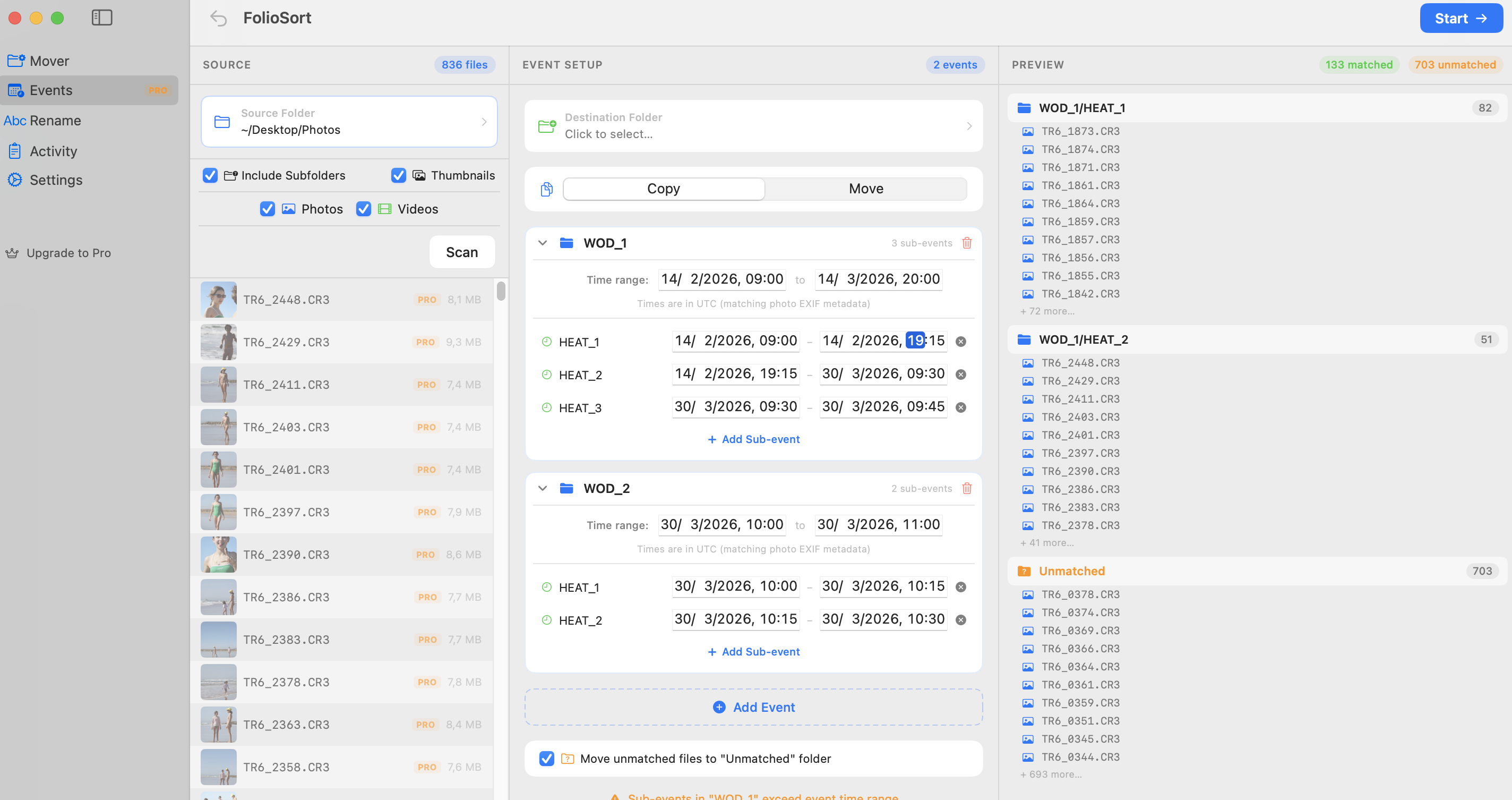
Define your shoot's timeline — getting ready, ceremony, reception. Point FolioSort at your SD cards. It reads the hidden EXIF timestamps and builds the exact folder structure your client expects. In under 10 seconds.
How time-block sorting eliminates hours of manual dragging.
Every structured shoot has a timeline. A wedding has Preparation, Ceremony, and Reception. A race has Registration, Heats, and Finals. A film set has Scene 1, Scene 2, Scene 3.
Events lets you enter that timeline directly into FolioSort. Each block gets a name and a time range. When you click Sort, every photo from every camera is matched to its block by EXIF timestamp and placed in the corresponding folder.
No manual sorting. No reviewing filenames. No cross-referencing schedules. The structure your client expects is already there before you open Lightroom.
3,200 photos from 3 cameras → perfectly sorted in under 30 seconds
Four steps from chaotic cards to a client-ready folder structure
Drag in every SD card from every shooter. FolioSort doesn't care if you mixed Sony, Canon, or drones. It treats time as the only metric.
Set up your time blocks (e.g. 14:00 - 15:30: Ceremony). You do this once per shoot, right from the schedule.
FolioSort shows you exactly which photos land in which folder before a single file moves. Spot any time-sync issues before they become a problem.
Click Sort. Every file is moved with checksum verification. If anything looks wrong, one-click undo puts everything back exactly as it was.
Every detail of Events is designed around real photographer workflows
Every photo is sorted by its embedded EXIF capture timestamp — not filename, not file date. Sub-second precision means no photo ends up in the wrong block.
Combine cards from your main camera, second shooter, and drone into a single pass. All files from all cameras sorted in one operation.
XXHash64 verification on every file. FolioSort confirms each photo arrived intact. Zero silent corruption — ever.
Made a mistake setting the timeline? One click reverts the entire operation and restores your source files. Persistent across sessions.
Works with JPG, HEIC, CR3, NEF, ARW, RAF, BRAW, R3D, and 40+ more formats. Events sorts whatever your camera produces.
Save your event structures as templates. Shoot the same conference series? Load your template and adapt the times — structure already built.
See how Events works for your specific type of shoot
Separate Getting Ready, Ceremony, Portraits and Reception from 3+ cameras into a client-ready structure in seconds.
Organise multi-day trips by day and location. Let GPS geocoding add city-level folders automatically.
Map heats, semi-finals and finals to time blocks. Every action shot lands in the right round folder automatically.
Separate Keynote, Breakouts, Networking and Awards from a full-day corporate event without touching a single file manually.
Track which artist was on which stage at which hour. Event blocks match the stage schedule — photos follow automatically.
Organise Procession, Ceremony, and Portraits for multiple graduating classes — sorted by time block, every time.
Ingest dailies by scene and shoot day. BRAW, R3D, ARRI, and standard video formats all handled in one pass.
Sort athletes by workout category and heat. Event blocks match the WOD schedule — no manual file management between events.
Map each of the 8 workout stations and running legs to time blocks. Athletes' photos land in the right station folder every time.
Events lets you define named time blocks — for example, "09:00–12:00: Getting Ready", "14:00–15:30: Ceremony" — and FolioSort automatically routes every photo into the matching folder based on its EXIF timestamp, across all cameras and memory cards simultaneously.
Yes — that's exactly what it's designed for. All files from all cameras are matched individually against the timeline by their own EXIF timestamp. It doesn't matter how many cameras or cards you import at once.
Photos that fall outside any defined event block are placed in an "Unassigned" folder so nothing is lost. You can review them and adjust your timeline if needed — then re-run the sort with full undo safety.
The Events feature is available in both Free and Pro tiers. The Free tier supports up to 100 files per operation. Pro removes that limit and adds RAW format support, GPS-based folders, custom templates and SHA-256 verification.
Yes. Save any event setup as a named preset and reload it for future shoots. Perfect for recurring events like monthly conferences or annual tournaments where the structure stays the same but the dates change.
Define the timeline. Click Sort. Walk away. Every photo organized exactly how it should be.