Duplicates
For anyone whose drive is quietly full of the same photo five times — the original, the AirDrop copy, the resized email version, the slightly-edited repost — FolioSort finds them all, shows exactly how they differ, and lets you reclaim the space with one click.
The truly maddening duplicates are the near-duplicates: the photo you cropped, the version Instagram re-compressed, the slightly smaller copy your phone made when you shared it. Byte-for-byte they're different files, so every "find duplicate files" tool that compares size or hashes walks right past them.
So your library keeps the same sunset eight times, your backups copy all eight, and you pay for storage on photos you already own. Deleting by hand means opening two windows, squinting at thumbnails, and praying you keep the right one.
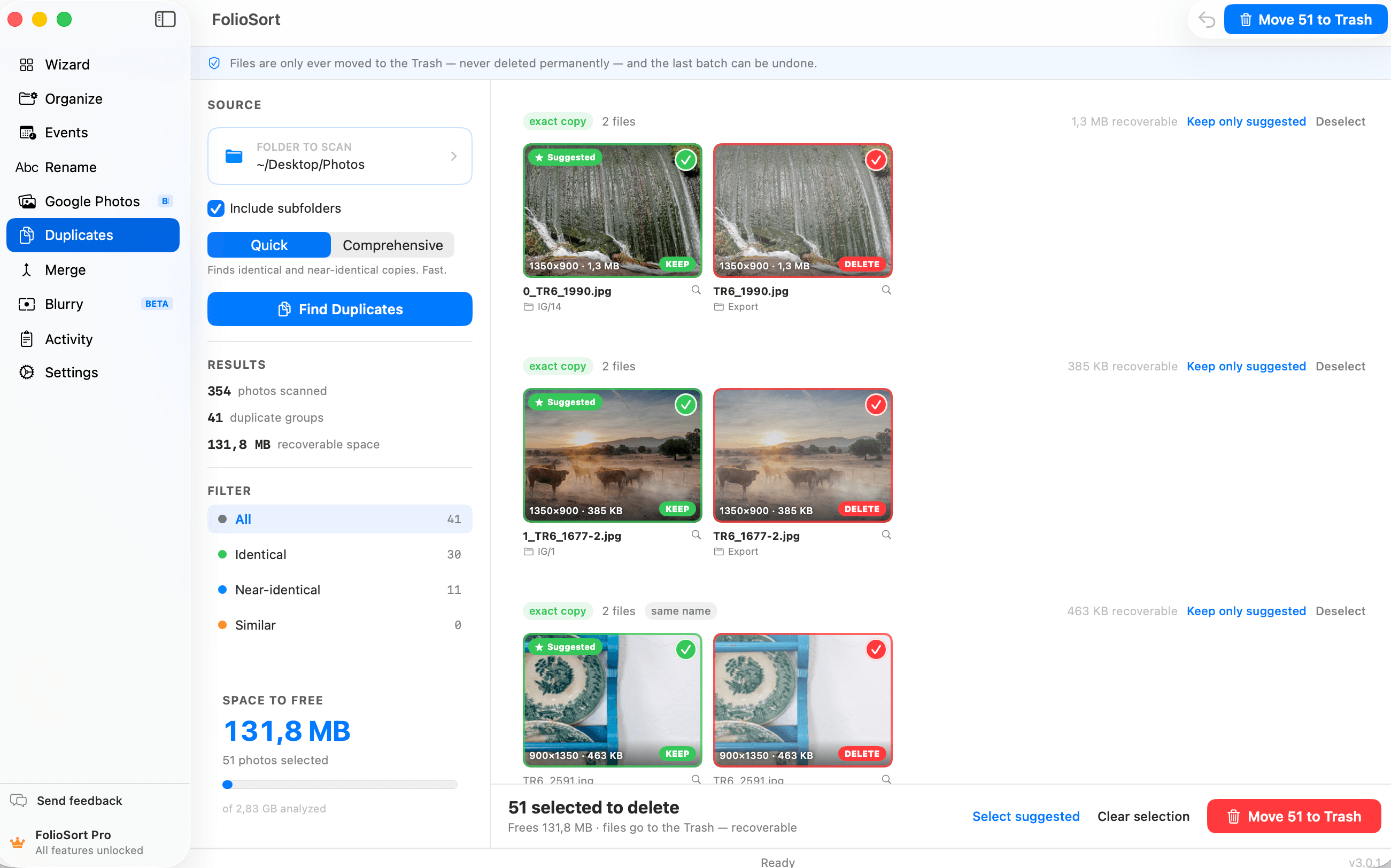
Duplicates finds visually identical and visually similar photos using perceptual fingerprinting. It groups every version of the same shot together, marks the best copy as the suggested keeper, and shows you exactly why they're grouped: same filename, same folder, different resolution.
You stay in control. Each copy has a clear Keep / Delete state you can toggle freely, a running counter shows how much space you'll reclaim before you commit, and a side-by-side compare view lets you zoom into any pair with capture date and camera — so you're never guessing.
Two modes fit the trade-off to the job: Quick finds identical and near-identical copies fast; Comprehensive digs deeper to catch resized and re-exported versions.
How it works
Choose a folder to scan, and whether to include its subfolders.
Quick for speed, Comprehensive for thoroughness — your call, depending on the job.
FolioSort groups every duplicate and near-duplicate, sorted with exact copies first.
See each group with its suggested keeper and space-to-recover total. Filter by type, select what to remove, and send it to the Trash.
Why it's safe
I'd tried three "duplicate finder" apps and they all only found exact copies — useless, because my problem was the same photo at five different sizes. FolioSort actually saw that they were the same picture. It found 56 GB I didn't know I was wasting, showed me each pair side by side, and I undid the one mistake I made instantly.
FolioSort doesn't just sort your photos — it cleans them up. Merge brings every scattered copy together; Duplicates removes the copies merging exposes; Blurry clears the shots you'd never keep.
Collapse every scattered copy of your library into one clean, de-duplicated archive.
Explore Merge →Find exact and visually similar copies — even resized and re-edited ones — and reclaim the space.
This pageScore every shot for sharpness, surface the blurriest first, and clear the throwaways.
Explore Blurry →FAQ
Yes — that's the point. Duplicates uses perceptual fingerprinting to compare what a photo looks like, not just its bytes, so it catches resized, re-compressed and slightly-edited copies that size or hash comparisons walk right past. On macOS it uses Apple's on-device Vision; on Windows it uses on-device perceptual hashing.
Nothing is deleted permanently. Removed files go to your system Recycle Bin or Trash, and an in-app undo restores them. You also see exactly how much space you'll reclaim before you confirm anything.
Quick finds identical and near-identical copies fast. Comprehensive digs deeper to catch resized and re-exported versions — it's slower, especially on macOS, but more thorough. The choice lets you match the trade-off to the job.
Always. FolioSort suggests a keeper, but each copy has a Keep/Delete state you can toggle freely — keep one, keep several, or keep them all. A side-by-side compare view lets you zoom into any pair with capture date and camera before deciding.
We wrote that comparison out properly, including the cases where one of them beats us: best duplicate photo finder for Mac and Windows. The short version — Czkawka is free and does perceptual matching; PhotoSweeper is the right tool if your photos live inside Apple Photos or Lightroom Classic; both Gemini 2 and PhotoSweeper are macOS-only.
Scanning and reviewing are free and unlimited — every duplicate group and the recoverable space are always on screen. On the free plan you can clean up 20 copies in total; Pro removes the limit for a one-time €19.99, with a 14-day money-back guarantee. No subscription, no account.
Point FolioSort at your library and see how many gigabytes are hiding in copies you forgot you made — then reclaim them, with nothing deleted without you.