The Organizer
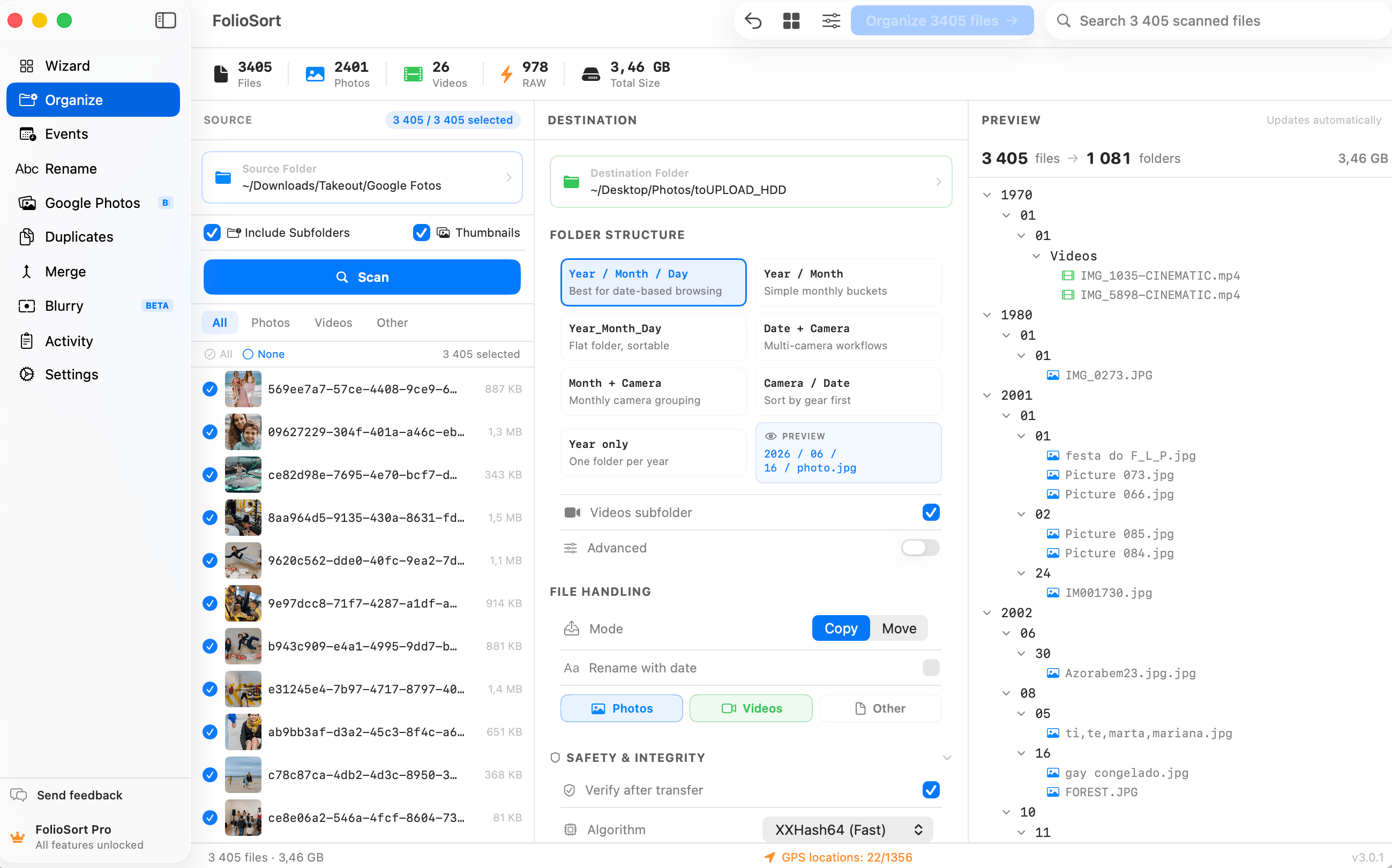
The Organizer reads the EXIF date, camera and GPS inside every file and places it exactly where it belongs in your folder structure. No scripts. No manual dragging. Just the clean, dated archive you always meant to have.
Ten years of phones, cameras and SD-card dumps, and it all lands in one giant folder — IMG_0431
next to DSC00218 next to a screenshot from last Tuesday. Sorting it manually is a weekend you
never get back, and drag-and-drop always rewrites the file dates so a single day's shoot ends up in three
different months.
The information to fix it is already there — every photo knows when and where it was taken. It just sits unread inside each file.
The Organizer reads the EXIF inside each file — real capture date, camera make and model, lens, ISO and GPS — and files everything into the folder structure you define, by those true values. Point it at a folder, pick a template, preview the result, run it.
It handles 91 formats — 46 everyday photo and video types free, plus 45 RAW and cinema formats with Pro — copies or moves with checksum verification, and every batch is undoable. Tens of thousands of files, sorted while you make coffee.
Don't want all of it to travel? The file type filter lists the types the scan actually found, with counts and sizes, so you can take only the JPEGs — or only the RAWs.
How it works
Choose the folders, drives or SD cards to organize — mix cameras, phones and formats freely.
FolioSort reads the real capture date, camera, lens and GPS from inside every photo and video.
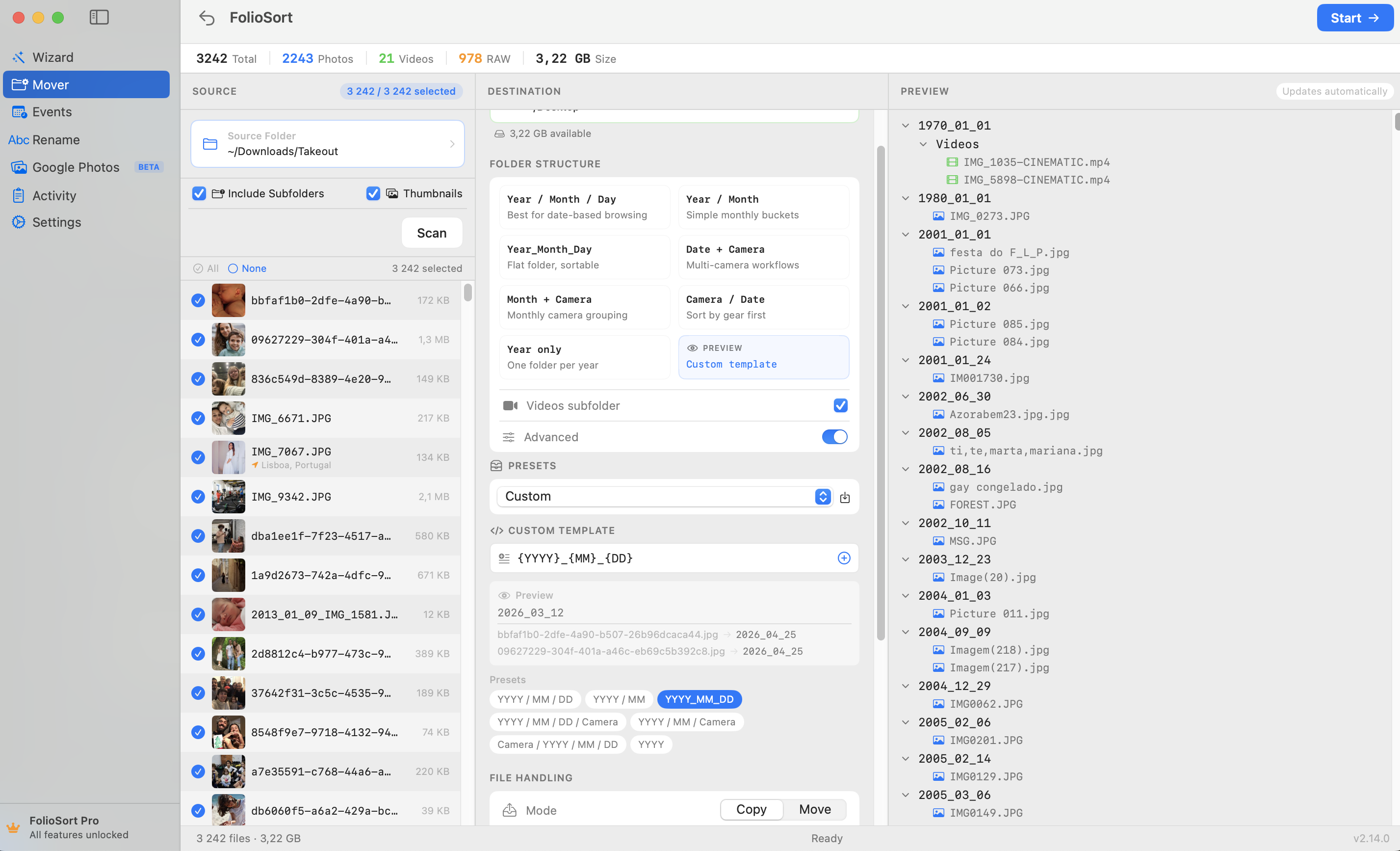
Sort by {YYYY}/{MM}, {Camera}, {City} — any structure — and preview the full tree before anything moves.
Run it. Files are placed checksum-verified, with one-click undo up to 50 batches back. No surprises.
What it does
{City} and {Country} folders out of them is Pro. Organize by location →{YYYY}/{MM}/{Camera}, {City}/{Camera}, {Lens} — and preview before you start..AAE from an iPhone edit or an .XMP from Lightroom is carried to the same destination as the file it belongs to, instead of being stranded in the folder you emptied.The vocabulary
A template is just these strung together with slashes. Four presets get you started; the builder previews every change against your own files as you type.
{YYYY} {YY} {MM} {DD} {HH} {mm} {ss} {SSS} {Month} {Mon} {Quarter} — the real capture time from the EXIF, down to the millisecond, with quarters for anyone who files by business period.{Camera} {Maker} {Lens} {ISO} {Aperture} {ShutterSpeed} — {Maker} groups a mixed library by brand before it splits it by body, which is the split most multi-camera shooters actually want.{City} {Country} {State} {Locality} {Lat} {Lon} — resolved from the GPS on your own machine. The raw coordinates are there too, for anyone whose filing is geographic rather than administrative.{Original} {Ext} {Extension} {Counter} {Counter:4} {ParentFolder} {ParentFolder:2} {Album} {Chat} — {ParentFolder:2} reaches two levels up, and {Album} and {Chat} carry the album a cloud export knew and the WhatsApp conversation a photo arrived in.Preview first
Duplicate handling your way — Skip, Replace, Replace if larger, or Keep both. Preset profiles save a template and settings under a name, so you switch between personal, client and video work in one click.
iCloud Drive auto-downloads cloud-only files before organizing, and it works straight to network drives — Synology, QNAP, TrueNAS and any SMB/AFP share. Both are free: where a photo lives stopped being a tier question in September 2026, and the 100-file batch limit is now the whole free rule. Every operation is written to an activity log you can export to CSV.
Moving thousands of files is high-stakes, so every copy or move is checksum-verified — XXHash64 or SHA-256 — to guarantee not one file is corrupted in transit, even across a network.
Every batch is undoable with one click, up to 50 operations back. And it all runs 100% on-device: no cloud, no account, no upload of your library. Ever.
Who it's for
YYYY/MM/DD folders by real EXIF date. Decades to accumulate; minutes to fix. Organize by date →{Country}/{City}/{YYYY}-{MM}-{DD}. Tokyo goes in Tokyo, Iceland in Iceland, automatically.I had 28,000 photos in one folder going back to 2009. I pointed FolioSort at it, picked a year-then-camera template, previewed it, and hit go. Ten minutes later my whole life was in dated folders — and I could undo the whole thing if I'd hated it. I didn't.
The Organizer is the core of FolioSort. Sort by real capture date and camera, geocode by place, and rename in bulk — build the exact archive your workflow needs.
Batch-sort tens of thousands of photos and videos by EXIF date, camera and folder templates.
This pageReverse-geocode GPS into city and country folders — on-device, in real folders.
Explore Location → Pairs withRename thousands of files by date, camera, counter or regex — with a live preview.
Explore Rename →FAQ
Yes — the Organizer is free to start and sorts up to 100 files per batch with no account. That batch limit is the whole free rule: network drives, iCloud and other cloud folders are free, and so is resolving GPS into place names (100 per scan). Pro removes the batch limit and unlocks the RAW and cinema formats, the location tokens that turn place names into folders, custom templates, saved profiles and regex renaming. Pro is a one-time €19.99, no subscription.
Your choice, per session. Copy mode leaves the originals in place; move mode relocates them. Both modes verify every file with an XXHash64 or SHA-256 checksum so you know each one arrived intact — no silent corruption, even to a NAS or external drive.
Yes. Every batch is tracked and reversible with one click, up to 50 operations back. Any file that would be overwritten goes to the Trash instead, so nothing is permanently lost.
JPEG, HEIC, TIFF, WebP, AVIF, all common video formats and 45 RAW and cinema formats including Canon CR3, Nikon NEF, Sony ARW and cinema RAW (BRAW, R3D, ARRI). RAW and cinema support is a Pro feature.
Any structure you like, using tokens: {YYYY}/{MM}/{Camera}, {YYYY}-{MM}-{DD}, {City}/{Camera}, {ISO}, {Lens} and more. You preview the full destination tree before a single file moves.
FolioSort is free to start. Pick a template, preview the result, and let the Organizer file every photo and video by real date, camera and place — checksum-verified, fully undoable, never uploaded.