Folio
Folio 312
312
2014 › 07 July › Faro
FolioSort 5 · macOS + Windows · pay once, own forever
FolioSort is a photo manager for Mac and Windows that works on the folders your photos are already in. It reads the real capture date, camera and place inside every photo, video and RAW, files them into clean, dated folders — then lets you browse, search and back up the whole library. Nothing imported, nothing uploaded.
What does your mess look like?
You're on a phone. FolioSort is a Mac and Windows app — there is nothing to install here. Send yourself the link and pick it up on your computer.
✉︎ Email me the download linkmacOS and Windows — see both builds →Free — no account, no card
Beforeone folder · 12,847 files
After{YYYY} / {MM Month} / {City}
That photo was not uploaded anywhere. Turn off your Wi-Fi and try again.
Act 01 — Organize
Every photo already knows when and where it was taken. FolioSort reads the EXIF inside each file and builds your folder structure from it — you just pick the template.
{YYYY}/{MM}/{Camera}/{City}, {Maker}, {Quarter}, {ParentFolder}. Four presets, or build your own.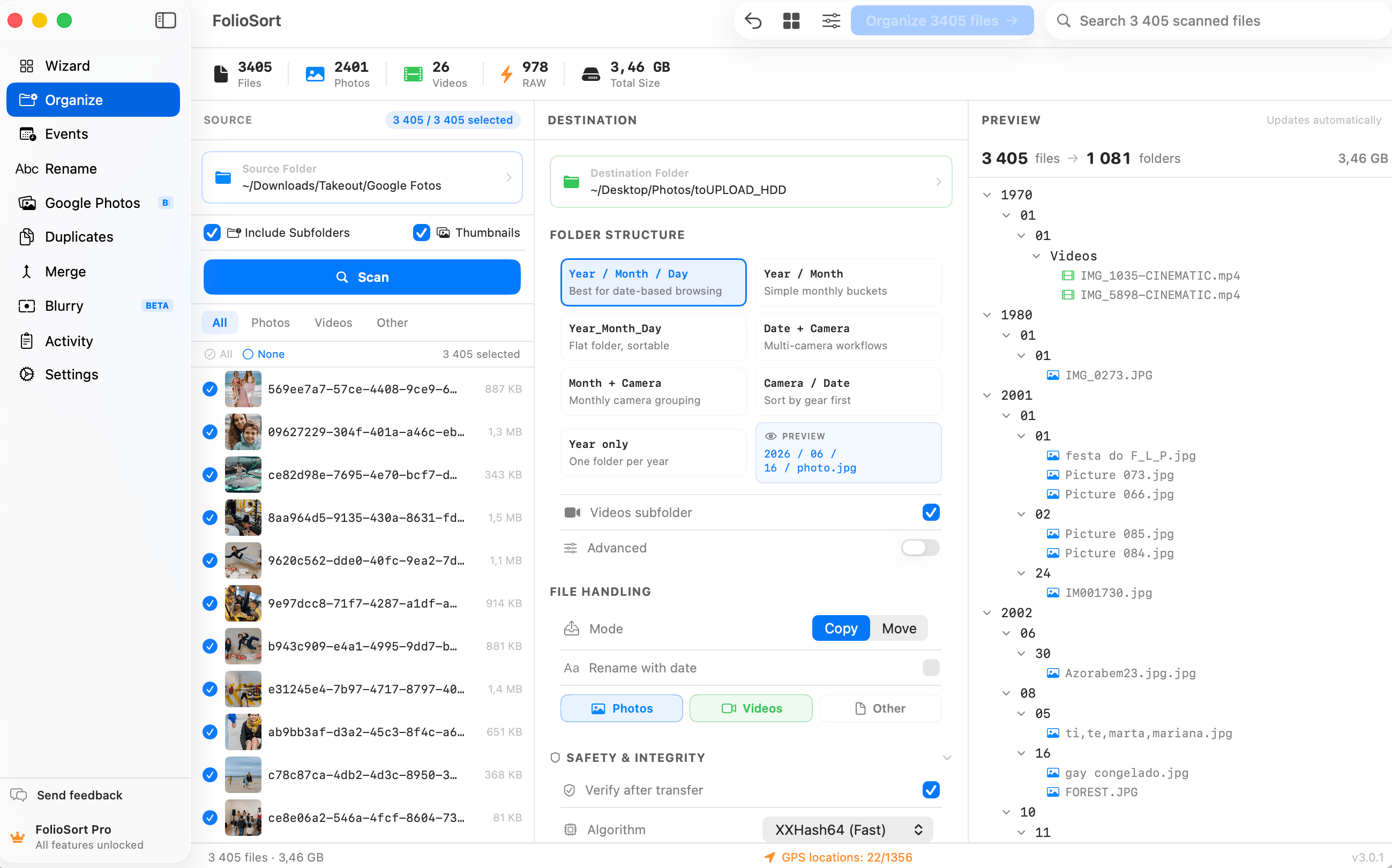 real app · not a mockup
Those are the app's own numbers, from the screenshot above. The right-hand column is the exact folder tree you will get — shown before a single file moves.
Act 02 — Clean
Years of camera dumps hide gigabytes of clutter: duplicates, blurry misfires, thousand-screenshot piles. FolioSort finds them all — you approve every deletion, nothing vanishes silently.
Byte-identical detection by checksum — never fooled by a filename.
Sharpness analysis flags the misfires; you review before anything moves.
Content-based detection sweeps screenshots out of your photo timeline.
Eight signals pick the keeper from every burst — and it learns what you keep.
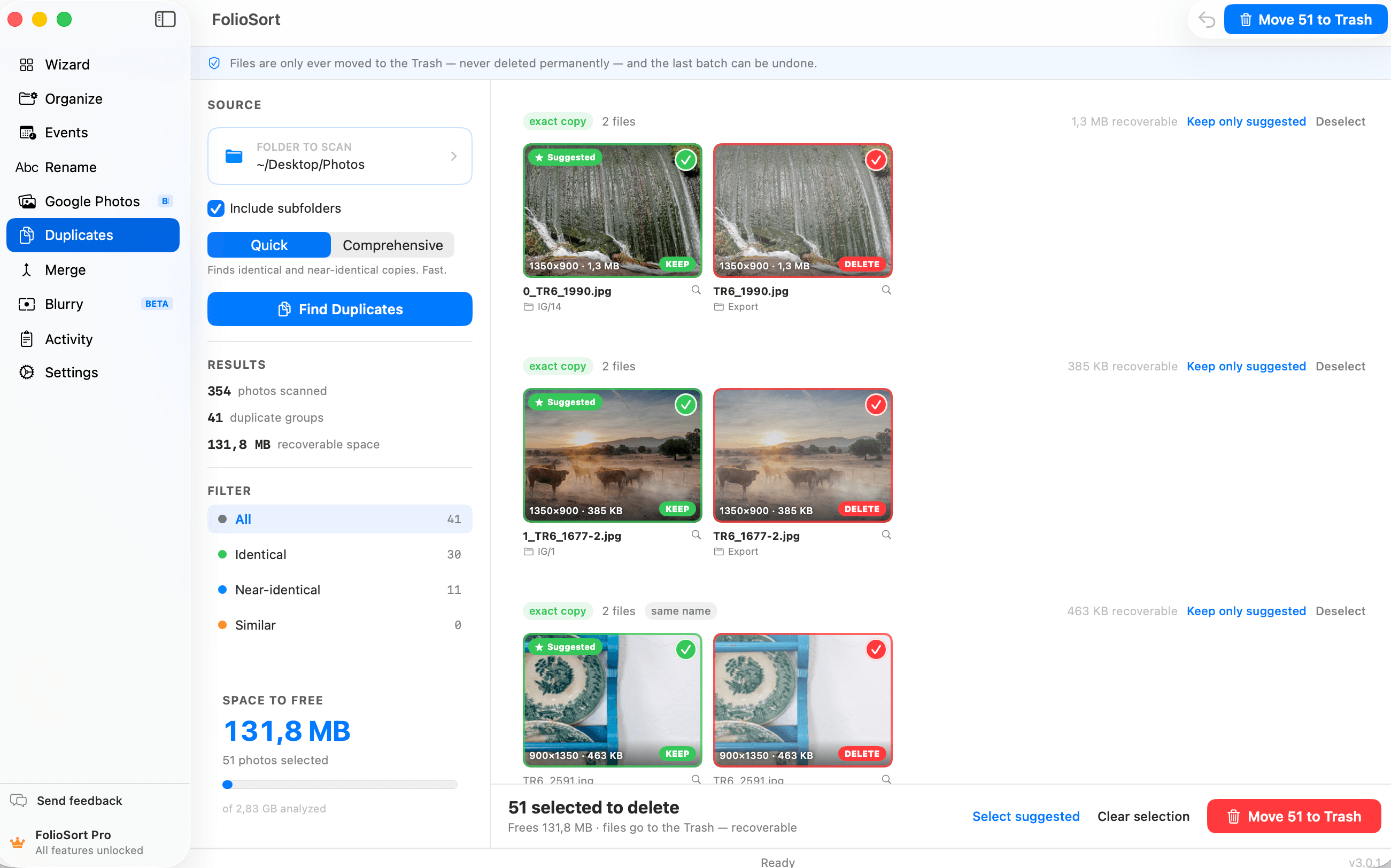 real app · not a mockup
Act 03 — Find
Search your library like you'd ask a friend: describe a moment, name a person, or find the text inside a screenshot. The same class of AI the cloud services run on their servers — running privately on yours, with Wi-Fi off.
runs on your machine · no upload · no account · works offline
Act 04 — Own
Your memories shouldn't live on someone else's computer. But leaving Google Photos or iCloud usually means a broken export: dates reset to today, GPS stripped, albums scattered. FolioSort repairs all of it and lands your library wherever you want it.
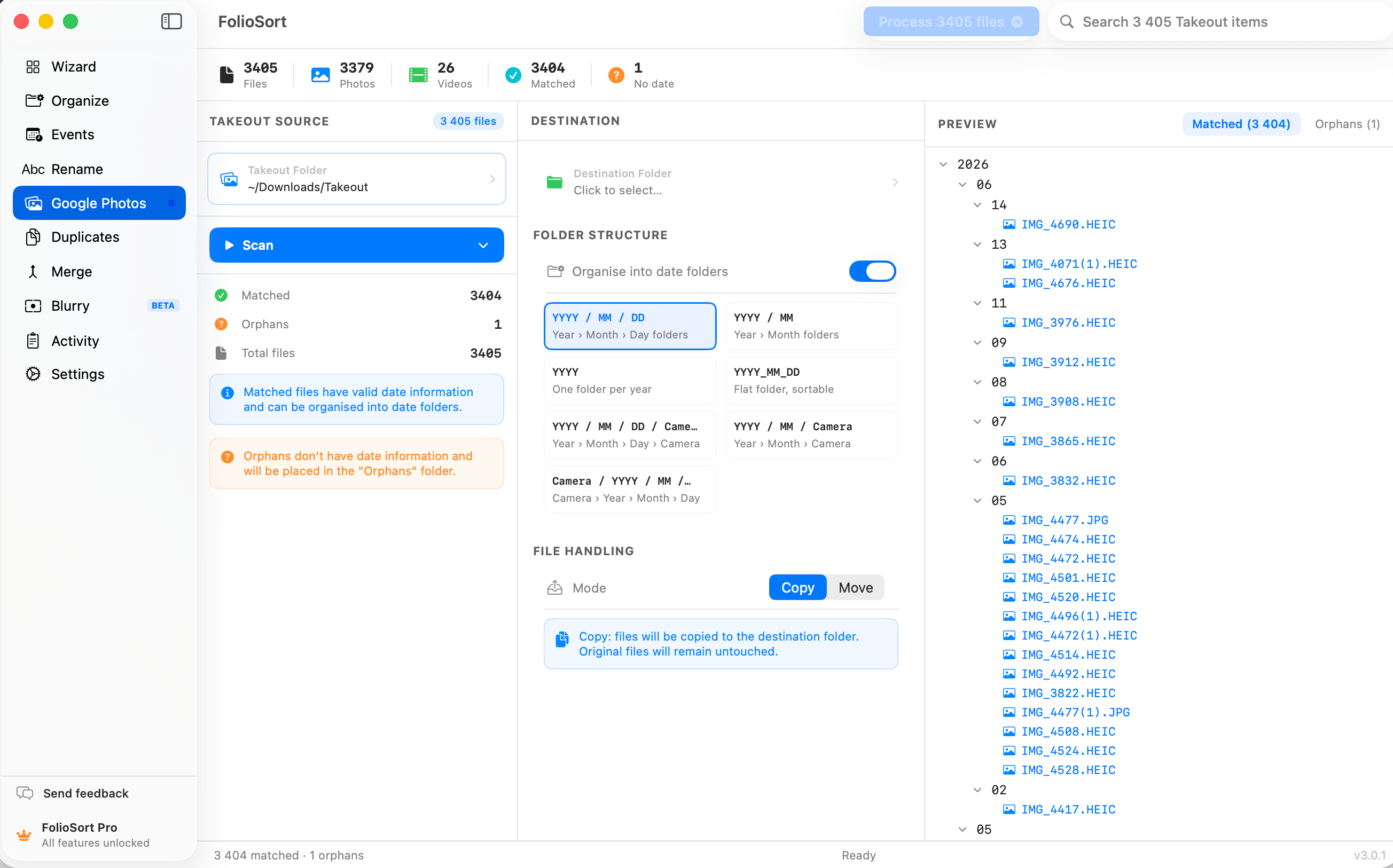 real app · not a mockup
Act 05 — Automate
Chain your steps — import, organize, rename, clean — into a Workflow you run with one click. Then let Watch Folders run it for you: drop files in, wake up to an organized library.
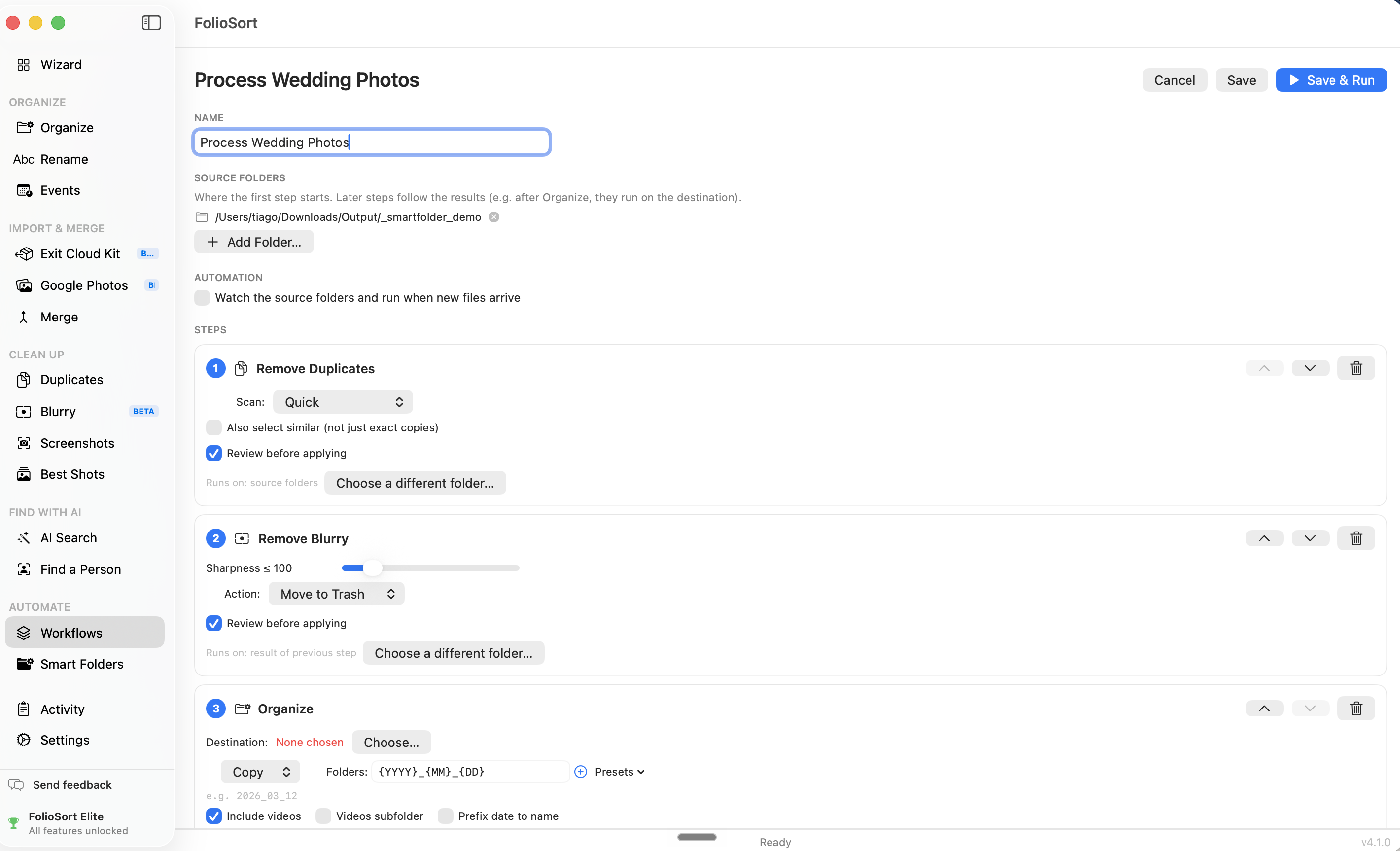 real app · not a mockup
Full disclosure
I'm Tiago. I built FolioSort because I had 28,000 unsorted photos and a deadline called "my family wants to see them". There's no venture capital behind this and no engagement metrics to feed — which is exactly why it works offline, needs no account, and will never become a subscription.
You're about to trust twenty years of photographs to a piece of software. That's a fair thing to hesitate over, so everything below is checkable: signed by Apple, listed by Microsoft, and a release history you can count yourself.
If it breaks, you email us. We're the ones who answer.

Don't take my word for it
I can't show you a five-star average, because I'd have to invent it. Here's what an independent third party has already checked on your behalf.
Every macOS build is code-signed with a Developer ID and notarized — Apple scans the binary before your Mac will open it. Updates arrive over Sparkle, signed the same way.
Checked by AppleThe Windows build passed Microsoft's store certification and is published on their servers, not mine — see the listing.
Checked by MicrosoftPayments run through Lemon Squeezy as merchant of record. They handle the card, the invoice and the VAT — your details never touch a server I control.
Handled by Lemon SqueezyFull refund within 14 days — no conditions and no questionnaire. And the free tier needs no card and no account, so you can test it on your own library first. Refund policy.
Your call, not mineTurn your Wi-Fi off, then organize a folder and run an AI search. Everything still works — because the photos never left your computer in the first place. That's the whole privacy promise, and you don't have to believe me about it.
From people who bought it
There aren't thousands of these, because there aren't thousands of customers yet. These three wrote to me after buying, and the words are theirs. When the Microsoft Store ratings start arriving, they'll show up here too — whatever they say.
I never thought I could organize all my family photos so fast. Truly amazing!
I can now organize all the events I photograph in under a minute — a real time-saver!
Finally, a solution that works — it let me migrate all my Google Photos to my computer.
Pay once. Own forever.
Start free — really free, no card, no account. Upgrade once, keep it for life.
Start here
Forever. No account, no card.
Acts 01–02 · unlimited
Lifetime license · 1 computer
All five acts · AI included
Lifetime license · 3 devices · Mac + Windows on one key
Comparable AI photo search tools cost €199–229. Full feature comparison →
At a glance
| Price | Free €0 · Pro €19.99 · Elite €29.99 — one time, not a subscription |
|---|---|
| Devices per licence | Pro: 1 computer. Elite: 3 devices, Mac and Windows on one key |
| What the free tier does | Google Takeout import always free, organize up to 100 files per batch, duplicate and blurry review plus your first 20 cleanups, AI taster (500-photo search index, 20 Find-a-Person actions) |
| Supported formats | 91 — 46 everyday photo and video formats free, 45 RAW and cinema formats with Pro (full list) |
| Requirements | macOS 14 (Sonoma) or later, Windows 10 or later. Identical feature set on both |
| Current version | 4.9.9 |
| Where your photos go | Nowhere. All processing is on-device and there is no account. Only anonymous, aggregated usage statistics are sent — never file names, paths or GPS |
| Refund | 14 days, whether or not the licence key has been activated (policy) |
Before you ask
No. FolioSort Pro and Elite are one-time purchases with lifetime licenses. Pay once, use forever. No recurring fees, no account required.
No. Your photos, videos and their contents are processed 100% locally and are never uploaded anywhere. Even the AI features run entirely on your own machine — they work with Wi-Fi off.
Yes. FolioSort verifies every transfer with checksums (XXHash64 or SHA-256), offers full undo for up to 50 batch operations, and never touches your originals without a verified copy.
Yes — with the Pro license. Canon CR2/CR3, Nikon NEF, Sony ARW, Fujifilm RAF, Panasonic RW2, Olympus ORF, Pentax PEF and more, plus cinema RAW from Blackmagic, RED and ARRI.
Yes, on every tier — where your photos live is not a paid feature. FolioSort works with SMB and AFP network shares (Synology, QNAP, etc.) and iCloud Drive, with auto-download for cloud-only files and resilient retry logic. The free version organizes up to 100 files per run; Pro removes the limit.
Every operation can be undone with one click. FolioSort keeps a persistent history of up to 50 batch operations across sessions and cleans up empty folders when reverting.
No, not to manage the library. FolioSort organizes it into dated, named folders, merges several drives into one de-duplicated library, clears out duplicates, blurry frames and screenshots, and finds any photo by plain-language search, face, text inside the image or automatic event — all on your machine, with no catalog and no import step. A second app is only for something FolioSort deliberately does not do: developing RAW files, or serving the library to your phone over the web. Because the output is plain folders and real EXIF, any of those opens it later without converting anything.
Yes. The Free tier is fully functional — organize up to 100 files per batch, review duplicates and blurry shots, and taste the AI search on 500 photos. Google Takeout import is free forever.
Full refund within 14 days of purchase — whether or not the license key has been activated, and you don't need to give a reason. Refunds are processed within 5–10 business days.
Download free, point it at your messiest folder, and watch twenty years of chaos become a library — before your coffee gets cold.