Library in numbers · new in FolioSort 5
The card you saw was made by FolioSort, on that person's own computer, from their own photos. It counts how much space your photos take, how much of it is RAW, the camera you reach for, the day you shot the most. Making yours is free, takes a few minutes, and nothing is uploaded.
This one is a real library: 3,873 photos and videos spread over three folders, the oldest from 2001. A quarter of it is RAW. The Canon EOS R6 took 43% of it, then two iPhones. The busiest day was a Saturday in November, with 198 photos, and the hour it shoots most is around noon.
None of that was typed in. FolioSort read it from the photos themselves — the date and camera every photo carries inside it — and drew the card. Yours will say something different, and that is the point.
The bars along the bottom are your years. Each colour is a folder or a drive, so a library spread across an old laptop, an external disk and a phone backup shows where each year actually lives.
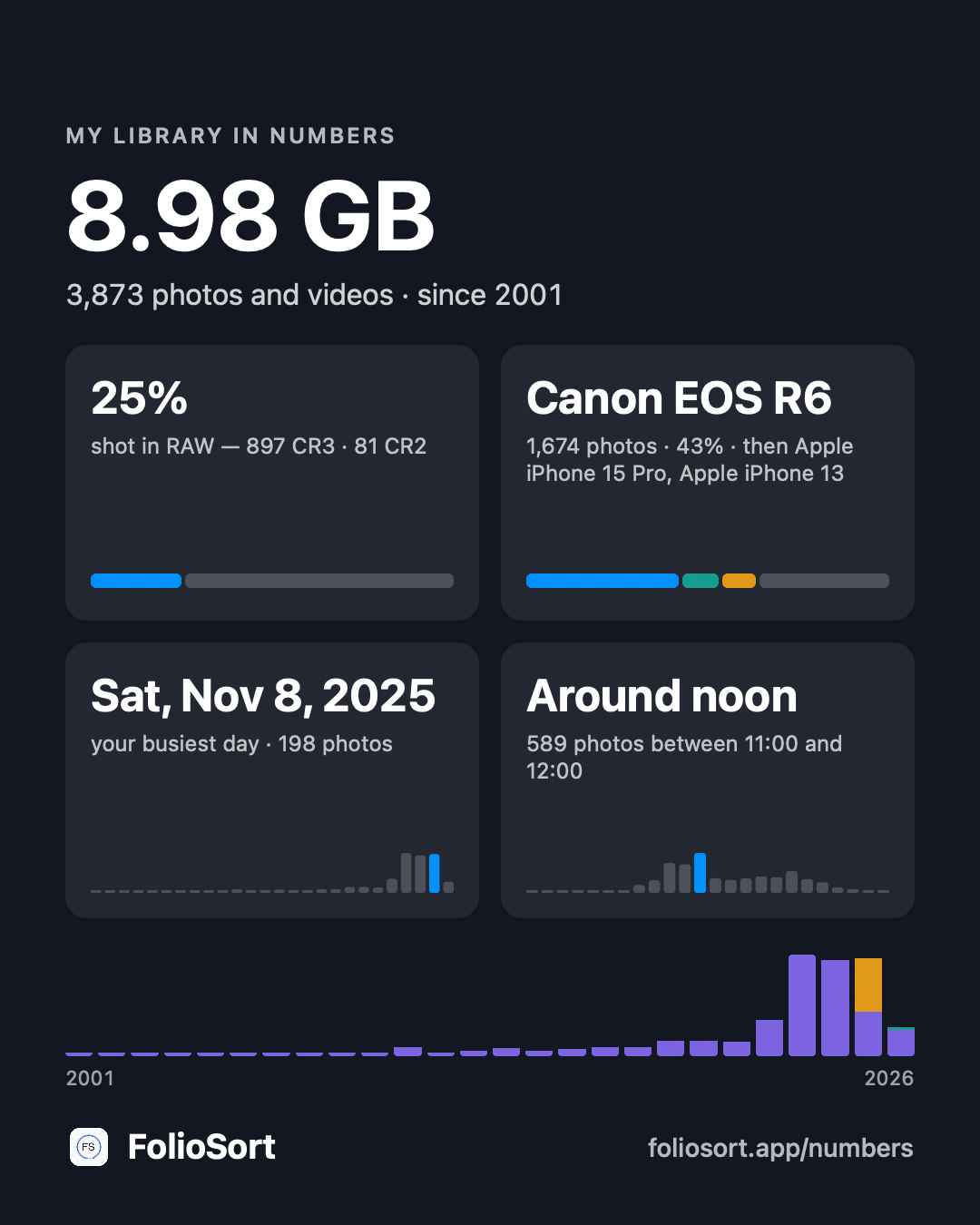
A card made by FolioSort, exactly as it comes out of the app.
How it works
Free, for Mac (macOS 14 or later) and Windows 10 or later. No account, no sign-in.
It starts with your Pictures and Desktop folders. Add any other folder or drive — your files stay exactly where they are.
On the Library's Home, "Your library in numbers" shows six tiles. Every number opens the photos it counts.
Save image…, Copy or Share… — a 1080 × 1350 card, Instagram's portrait size. Tick Add a photo if you want one behind it.
What it counts
Open the full sheet for the rest: your library year by year, the places and people in it, and how it splits into photos, RAW, videos and screenshots.
Most "year in review" cards are made on a server that already holds your photos. This one is not. FolioSort reads the photos on your computer, works out the numbers there, and draws the card there.
The card is an image saved on your computer. It goes where you send it, and nowhere else.
On it: totals, the share of RAW, camera names, your busiest date, the hour and weekday you shoot most, and your years.
Not on it: file names, folder names, places or faces. A photo appears only if you tick Add a photo — and then it is the best shot of your busiest day, so you see it before you share it.
FolioSort has no account and never sends a photo, a file name or a path anywhere.
The card comes from the Library, which shows every photo on every drive you add in one timeline.
The Library and Library in numbers are free and unlimited — reading every folder and drive, the six numbers, the full sheet and the card. Once you have seen your library, FolioSort can also organize it, clear its duplicates, fix its dates and keep a verified backup of it; some of that runs free up to 100 files, and Pro and Elite remove the limits for a one-time payment, with no subscription.
The numbers are usually the first time anyone sees their whole library at once. Here is where people go next.
A big number on the card is often the same photos twice. Find the copies, keep the best, review before anything goes.
Find duplicates → OrderTwenty years in one folder? Sort everything into dated folders by the date inside each photo.
Organize by date → EverythingThe Library across every drive, AI Cull, Tag & Fix and Protect — what else the app does with your photos.
See all features →FAQ
Yes. FolioSort is free to download, and the Library and Library in numbers are free and unlimited on every plan — including making, saving and sharing the card. There is no account. Pro and Elite are one-time purchases for other things, like organizing more than 100 files at a time or AI search.
No. FolioSort reads your photos on your own computer and draws the card there. The card is an image file saved on your computer; it goes wherever you choose to share it, and nowhere else. FolioSort never sends a photo, a file name or a path anywhere.
How much space your photos and videos take and how many there are, then up to four facts: how much is RAW, the camera you use most, your busiest day, and the hour and weekday you shoot most — with your years along the bottom when there is more than one. It shows no file names, no places and no faces. A photo appears only if you tick “Add a photo”, and then it is the best shot of your busiest day.
The ones in your Library. The first time you open it, FolioSort starts with your Pictures and Desktop folders; add any other folder or drive — an external disk, a NAS, a cloud folder already on your computer — and it is counted too. Your files stay exactly where they are.
Yes. Library in numbers is in FolioSort for Mac (macOS 14 or later) and for Windows (Windows 10 or later), with the same card.
Yes — the card is 1080 × 1350, Instagram's portrait size. Use Share… to send it to your phone, or Save image… and post it from there.
Download FolioSort, let it read your folders, and open "Your library in numbers" — a card about your own photos, made on your own computer.