Best Shot · Delete similar photos · Mac & Windows
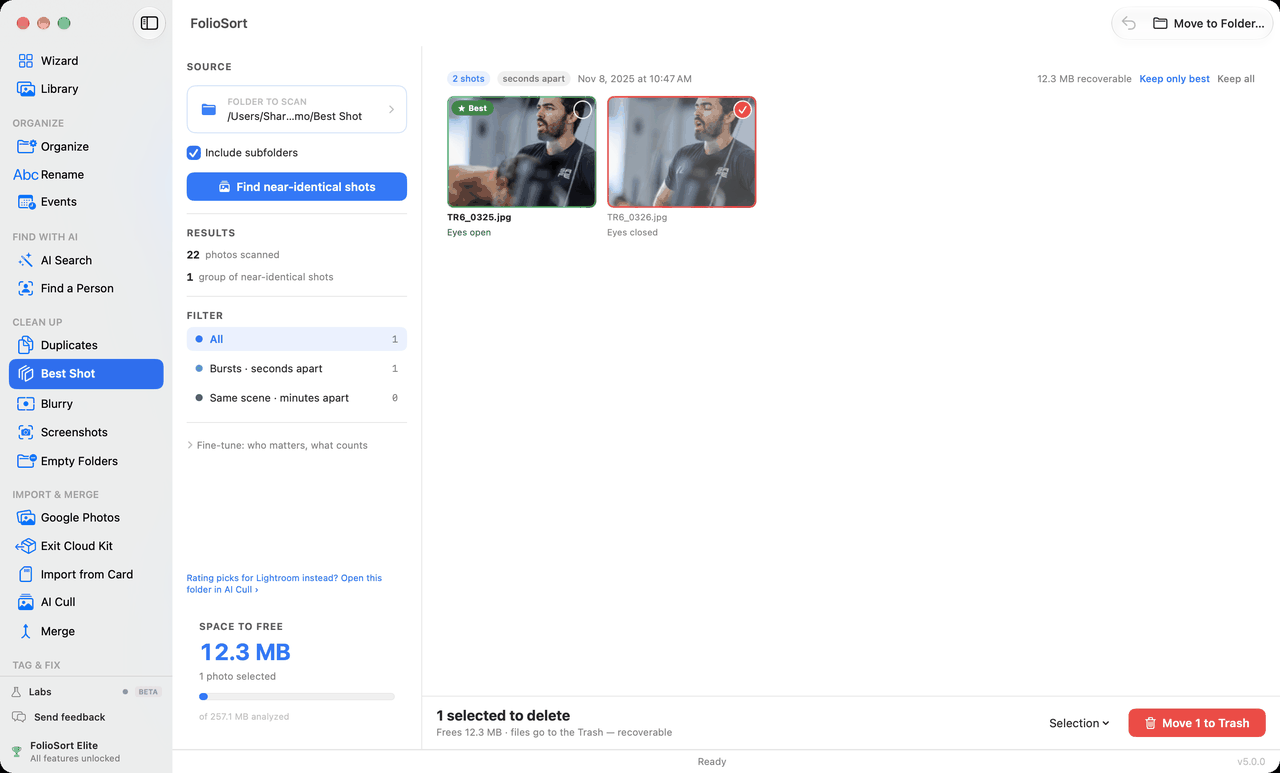
FolioSort's Best Shot finds the bursts and retakes in a folder, marks the best shot of each with the reason it won — Eyes open, Best faces, Eyes in focus — and selects the rest for the Trash, where they stay recoverable. You look at every group before anything moves. All on your own computer.
Hold the shutter at a birthday and you get a dozen frames: one with everyone's eyes open, eleven with a blink, a blur or a half-smile. Take the group photo again two minutes later and you have four more. None of them is a copy of another file, so a duplicate finder walks straight past them — and picking the keeper by hand means squinting at near-identical thumbnails, so nobody does.
It groups the shots of one moment that look alike, picks the best of each on sharpness, faces, open eyes, the eyes' focus and exposure, and writes under it why — so you can disagree in one glance. The rest of the group is selected, the space it would free is counted, and you decide.
Best Shot sits in Clean Up, right beside Duplicates: Duplicates finds the same photo saved twice; Best Shot finds the dozen you took to get one.
How it works
Pick a folder, include its subfolders if you like, and press Find near-identical shots. It reads the capture times, compares the shots and picks the best.
Shots a few seconds apart and the same scene shot again minutes later are found in one pass. Filter by Bursts · seconds apart or Same scene · minutes apart.
The best shot of each group is marked Best with its reason; the rest are selected. Click a shot to enlarge and compare, click its circle to keep it, or use Keep only best / Keep all.
The bottom bar says how many are selected and how much space that frees. Move to Trash — or Move to Folder… — after you confirm. Undo brings back the last batch.
What makes the best shot
Why it's safe
Same engine, other job
Best Shot is for clearing a folder. If you are a photographer picking the keepers of a shoot — stars and rejects for your cataloguer, nothing deleted — the link at the bottom of the panel opens the same folder in AI Cull, where you decide every photo with one key and write the result as standard XMP ratings.
…it says so, counts the photos it could not compare because they carry no capture time, and offers to look for copies of the same photo in Duplicates instead.
Scan any folder, as often as you like, and see every group, every pick and the space you would free — on the free plan, with no limit. The free plan also cleans up 20 shots in total, counted in photographs, so you can check on your own photos that it is safe and reversible.
Elite removes the limit — a one-time purchase, no subscription. Unlimited cleanup is not part of Pro. FolioSort 5 is a free update for everyone who bought Pro or Elite. See pricing →
Duplicates removes copies of the same file. Best Shot thins the bursts and retakes. Blurry clears the shots that were never sharp. And AI Cull is for picking the keepers of a shoot for Lightroom.
The same photo saved twice — identical or re-saved — found and cleared safely.
Explore Duplicates → Cull a shootOne key per photo, stacks of near-identical shots, and the result written for Lightroom.
Explore AI Cull → Clear the blurScore every photo for sharpness and sweep out the out-of-focus ones.
Explore Blurry →FAQ
Duplicates finds the same photo saved twice, as identical or re-saved copies of one file. Best Shot finds different photos of the same moment: the burst you fired to get one sharp frame, or the group photo taken four times. In FolioSort they sit side by side in Clean Up, and when a folder has no near-identical shots, Best Shot offers to look for copies in Duplicates instead.
Shots that look alike and were taken close together: within 3 seconds of each other for a burst, or the same scene shot again within 2 minutes. Both are found in one pass and can be filtered as Bursts · seconds apart or Same scene · minutes apart. Grouping uses the capture time in the file, so photos without one are counted and left out of the comparison.
Every shot is scored on sharpness, face quality, open eyes, how sharp the eyes are, and exposure. The winner is marked Best with the one reason that decided it: Eyes open, Best faces, Eyes in focus, Best exposed or Sharpest. When nothing separates the shots it says Too close to call. Under Fine-tune you can change how much each signal counts and the pick updates live; shots you marked by hand stay as you left them.
No. The rest of each group is selected for the Trash, but nothing moves until you press Move to Trash and confirm. Files go to the Trash, or the Recycle Bin on Windows, not straight to deletion, and Undo brings back the last batch. An exposure bracket is kept whole, and a RAW and its own JPEG are one photograph, so both files always go the same way.
Finding and reviewing near-identical shots is free and unlimited. The free plan cleans up 20 shots in total, counted in photographs, so you can see on your own folder that it is safe and reversible. Elite removes the limit as a one-time purchase, with no subscription. Unlimited cleanup is not part of Pro.
Then use AI Cull. Best Shot has a link, Rating picks for Lightroom instead? Open this folder in AI Cull, that opens the same folder in FolioSort's culling screen, where keepers and rejects become standard XMP ratings and nothing is moved.
No. Grouping and scoring run on your own Mac or PC. There is no account and no cloud, and nothing about your photos is sent anywhere.
No. Best Shot keeps the last scan. Close the app halfway through and the groups are there the next time, under “Results from your scan on …”, with any shot changed or removed since then left out. Scan again whenever you want a fresh look.
Download FolioSort, point Best Shot at a folder, and keep the best of every burst — reviewed before anything moves, recoverable after. Entirely on your own computer.