Best Shots · AI Culling · Elite
You fire off a burst to get the shot — then ten almost-identical frames sit in your library forever. Best Shots groups each burst and weighs eight technical signals per frame — from sharpness measured where the picture is meant to be sharp to what the exposure threw away — then stars the one to keep. It learns what you keep as you correct it. You review; nothing is ever deleted automatically. 100% on-device, no cloud, no account.
Every kid's birthday, every jumping-shot, every "hold still, one more" — you hold the shutter and get five, ten, fifteen frames. One of them is sharp with everyone's eyes open. The other fourteen are blinks, motion blur and half-smiles. Deleting them by hand means squinting at near-identical thumbnails, so nobody ever does it. The duplicates just pile up and eat your disk.
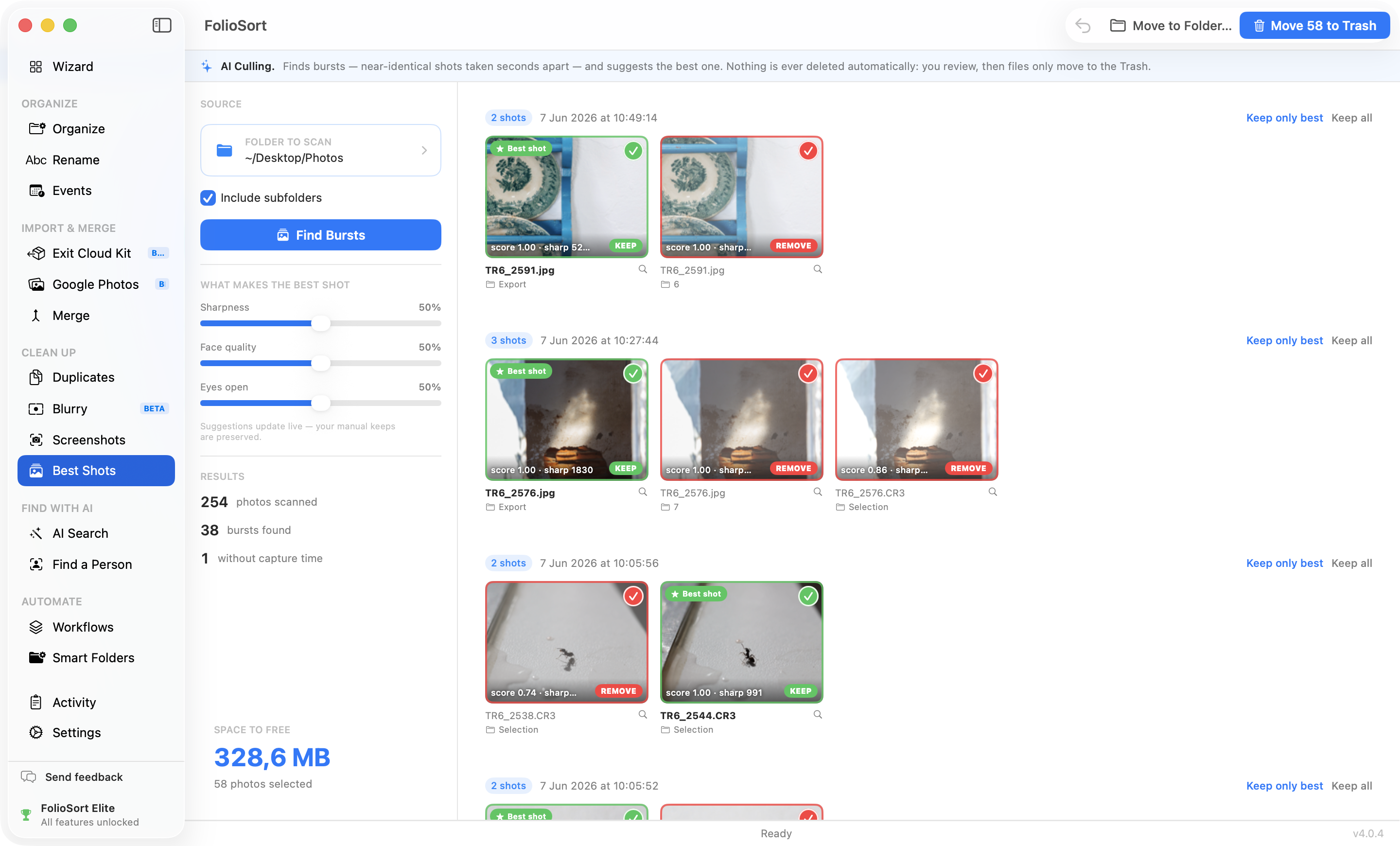
Best Shots does the squinting for you. It groups each burst — or, on the Moments setting, the same scene shot again over a couple of minutes — and weighs eight technical signals on every frame: sharpness where the subject is, the eyes on their own, face quality, exposure, exposure brackets, RAW+JPEG pairs and the people you said you care about. The best frame is starred. You glance at the group, agree or pick your own, and clear the rest in one click — to the Trash, never permanent deletion, always undoable. And every time you spare a frame it armed, it learns a little more about what you keep.
How it works
Bursts finds shots taken within 3 seconds of each other that also look alike. Moments widens the clock to two minutes and tightens the picture test, so the group photo you took four separate times comes back as one group.
Eight signals per frame — sharpness where the subject is, the eyes on their own, face quality, eyes open, exposure, brackets, RAW+JPEG pairs and priority people. The best frame is starred.
Six live sliders re-weight every signal, including how much its read of your own taste counts. Suggestions re-rank instantly — no re-scan — and your manual keeps stay put.
Keep only the best, keep all, or hand-pick. Write your picks into the photos as star ratings so Lightroom already knows them — or send the losers to the Trash or a folder. Both undoable.
What makes the best shot
Culling you can trust
The scary version of auto-culling deletes your only good frame while you're not looking. Best Shots is the opposite: it never removes anything on its own. Every burst is shown with its suggested keeper, and only the frames you confirm are cleared. A running "space to free" counter shows exactly what your current selection will reclaim before you commit.
Non-keepers go to the Trash or a folder you choose, never straight to permanent deletion, and the last batch can be restored with one click. It's the same checksum-verified, fully undoable engine behind every FolioSort tool — running entirely on your PC, with nothing uploaded anywhere.
Why it's safe
My camera roll was 60% burst frames I was too lazy to sort. FolioSort grouped them, starred the sharp one with everyone's eyes open, and I just clicked through agreeing. Got back a shocking amount of space in a coffee break — and nothing was gone for good, it was all sitting in the Trash.
Same screen, second mode
Best Shots also has a Review mode: the whole folder, one photo at a time, one key press each — keep, reject, stars, colour labels — with no wait between frames and a 100% zoom to check the focus. The bursts arrive with the sharpest frame already marked, so you only confirm.
Stars and colour labels are written as XMP:Rating and XMP:Label, so Lightroom,
Bridge and Capture One pick them up — and you can copy or move exactly the photos your filters are showing.
See keyboard culling →
Best Shots thins your bursts down to the keepers. Find Duplicates removes the exact copies. Find Blurry Photos clears the frames that were never sharp to begin with.
Keep the sharpest frame of every burst — scored, reviewed and undoable.
This pageFind and safely remove exact and visually similar duplicate photos, byte-verified.
Explore Duplicates → Clear the blurScore every photo for sharpness and sweep out the out-of-focus ones.
Explore Blurry →FAQ
A burst is a group of shots taken within about three seconds of each other that also look alike — the frames you fire off trying to get the one good one. FolioSort groups them using EXIF capture times plus a visual-similarity check, so unrelated photos taken at the same moment don't get lumped together. There is a second setting, Moments, that widens the clock to two minutes and tightens the picture test instead — for the group photo you took four separate times rather than one press-and-hold.
Eight signals go into every frame's score: sharpness measured where the subject is rather than averaged over the frame, the eye region scored on its own, face quality and eyes-open for every face that is a real subject, what the exposure clipped at each end of the histogram, whether the group is an exposure bracket, whether a RAW and a JPEG are the same photograph, and any people you marked as priority. The highest-scoring frame is starred. You control the mix: six live sliders re-weight each signal and the suggestions re-rank instantly with no re-scan. Any frame you keep by hand is always preserved.
Never. Best Shots only ever suggests — you review every burst and choose what to remove. Non-keepers move to the Trash or a folder you pick, nothing is deleted permanently, and the last batch can be undone with one click.
No. All grouping and scoring runs entirely on your PC — no cloud, no account, no upload. Your photos never leave your computer.
Any photo with an EXIF capture time can be grouped into bursts; photos without one are simply skipped and reported. Face-quality and eyes-open scores apply when faces are present — landscapes and other shots are still scored on sharpness and exposure.
Yes, and without training anything. Every time you spare a frame Best Shots had armed, that pair — this one over that one — nudges a direction it keeps for you. No model is downloaded, nothing is uploaded, and one correction moves it a little rather than all at once. There is a slider for how much that read of your taste counts, and it contributes nothing until enough corrections exist for it to mean something.
Both are protected. A RAW and its JPEG are treated as one photograph — one decision, both files, and any star rating lands on both. An exposure bracket is recognised as a bracket rather than a burst, so all its frames are left alone instead of two thirds of your dynamic range being armed for the Trash.
Best Shots is part of Elite, FolioSort's top tier with the full on-device AI suite. Elite is a one-time purchase (€39.99) — no subscription. Free and Pro don't include it. See pricing →
Let Best Shots find the keeper in every burst — eight signals per frame, learning what you keep as you go, reviewed before anything is removed and undoable after. Entirely on your own PC.