Find Screenshots · AI Search · Pro
Receipts, memes, maps, app captures — screenshots quietly outnumber your actual photos. FolioSort spots them automatically and lets you sweep them out in one pass, to the Trash or a folder you choose. Undo anytime.
Every screenshot lands in the same camera roll or folder as your memories: the boarding pass, the recipe, the funny chat, the parking spot you photographed so you'd remember it. Useful for a day, clutter forever.
Over years there are thousands of them, scattered between the photos you actually care about — and deleting them by hand means scrolling forever and second-guessing every one.
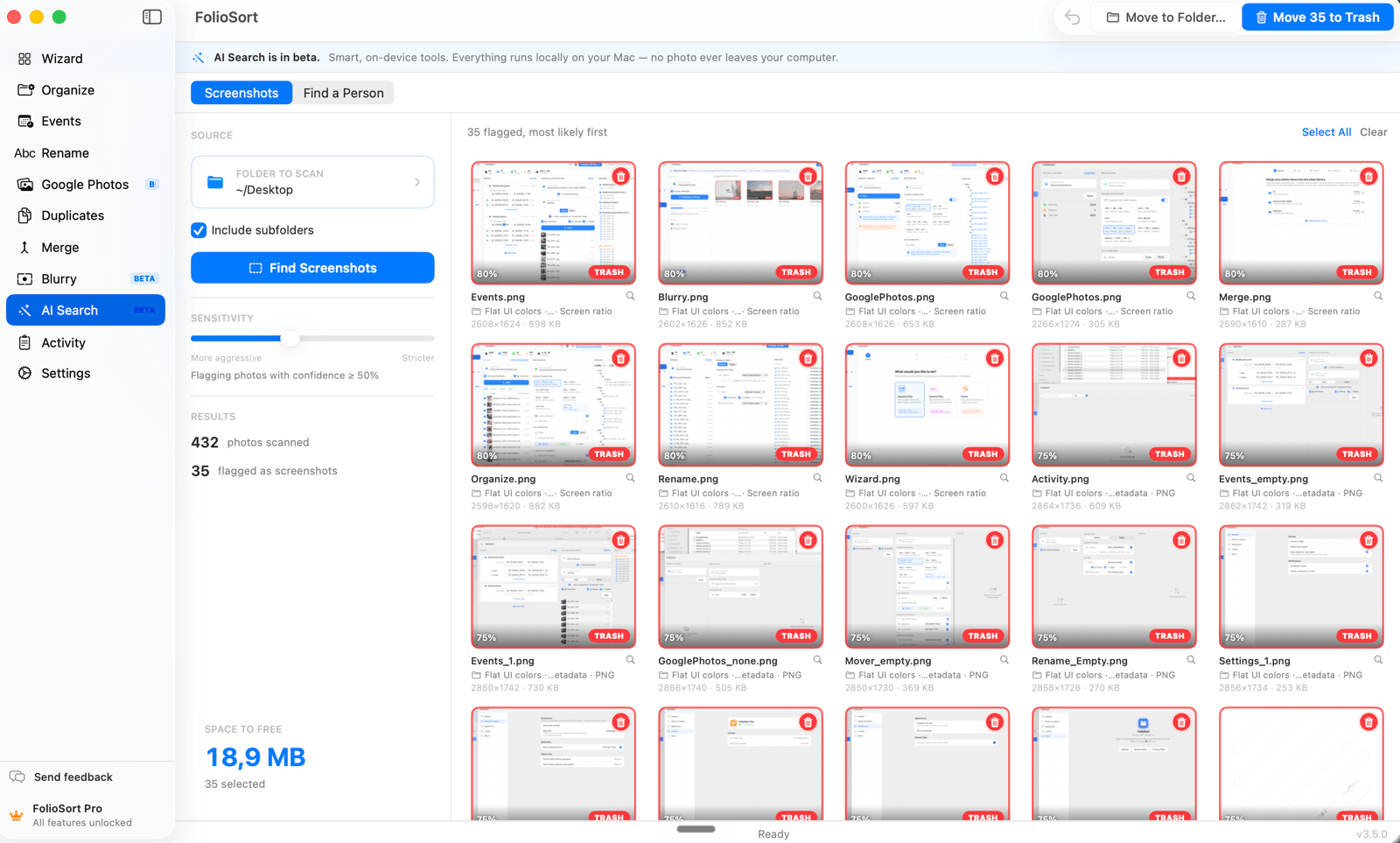
Find Screenshots scores each image on the signals that give screenshots away — filename patterns, no camera/lens EXIF, PNG format, screen aspect ratio, capture-app tags — and flags the likely ones with a confidence score.
A sensitivity slider widens or tightens the net; you review, then Move to Trash or Move to a folder to file them away. Everything's on-device and undoable. It also runs inside Merge Sources, auto-excluding screenshots when you merge libraries.
How it works
Choose a folder to scan, with or without its subfolders.
FolioSort scores every image, putting the most-likely screenshots first.
Drag the sensitivity slider to widen or tighten the net, then review the flagged shots.
Move to Trash or out to a folder — undo anytime.
Why it's safe
Half my "photos" turned out to be screenshots — receipts, memes, directions I'd snapped years ago. FolioSort rounded up over three thousand of them in one scan and I sent the lot to the Trash without touching a single real photo.
FolioSort's AI Search runs entirely on your device. Find Screenshots sweeps out what isn't really a photo; Find a Person pulls every shot of someone out of the pile; Duplicates removes the copies.
Add a few reference photos and find every shot of that person in a folder — entirely on-device.
Explore Find a Person →Spot the screenshots hiding among your real photos and clear them out in one pass.
This pageFind exact and visually similar copies — even resized and re-edited ones — and reclaim the space.
Explore Duplicates →FAQ
It scores each image on filename patterns, missing camera/lens metadata, PNG format, screen aspect ratio and capture-app tags — then flags the likely ones with a confidence score you can tune.
No. It only flags candidates; you review and choose. Removals go to the Trash/Recycle Bin and can be undone, or you can move screenshots to a folder instead of deleting.
Yes, fully on-device. No cloud, no account.
Scanning and reviewing are free. The free plan clears up to 20 screenshots in total; Pro is unlimited for a one-time €19.99.
Point FolioSort at a folder and watch it round up the receipts, memes and app captures hiding among your real photos — then clear them in one pass, with nothing deleted without you.