Find a Person · AI Search · Elite
Point FolioSort at a folder, add a few photos of the person, and it finds the rest — the group shots, the ones from across the room, the candids you'd never dig out by hand. It all happens on your computer: no cloud, no account, no face ever leaves your device.
Every shot of your kid, your partner, a close friend is buried across folders, shoots and years — the posed ones and the candids, the close-ups and the group photos where they're half-hidden at the back. Finding them all by hand means scrolling forever and still missing half.
The cloud tools that can find them want your whole library uploaded and your faces scanned on someone else's servers — turning your most personal photos into someone else's data.
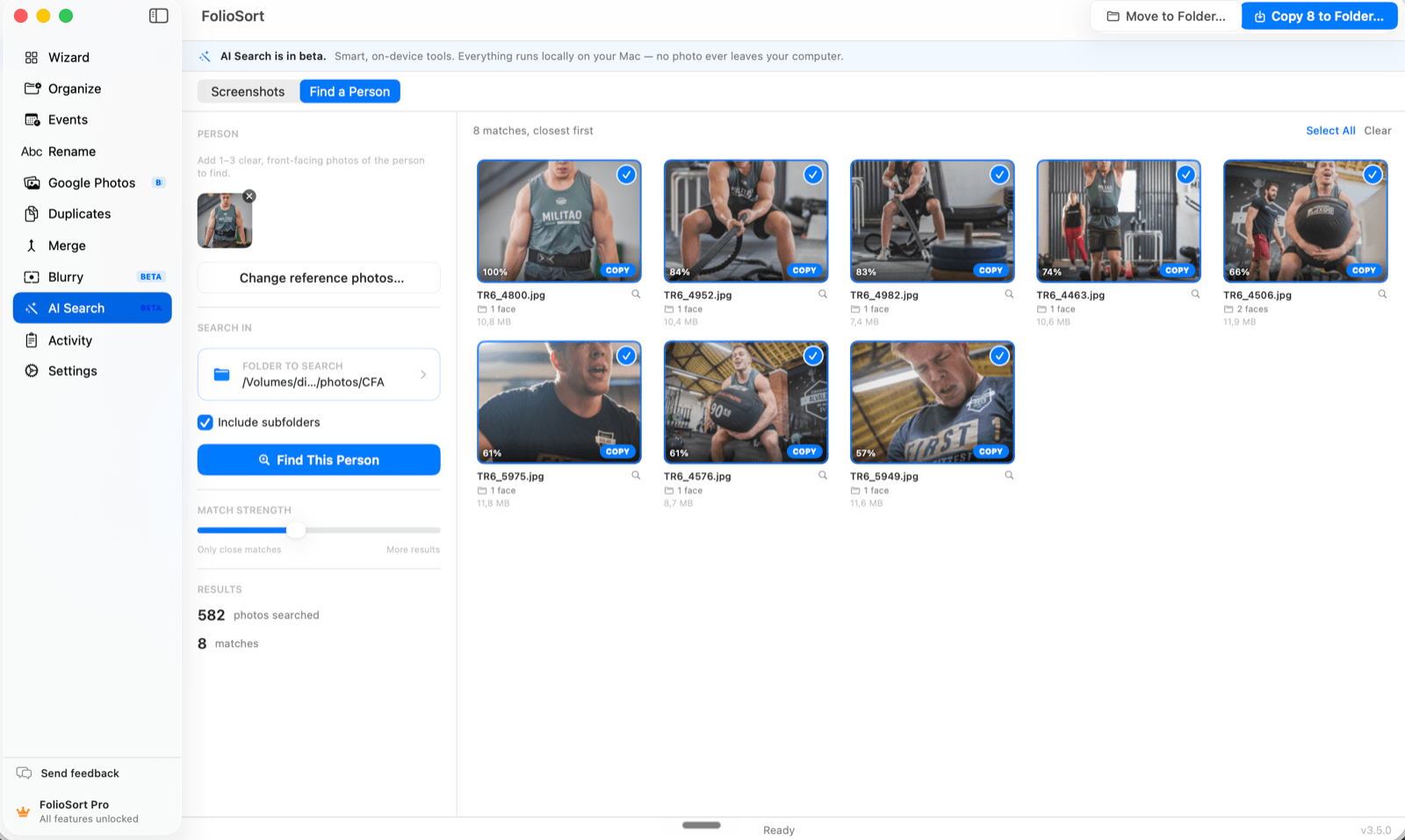
Add 1–3 clear photos and Find a Person detects and aligns each face, then compares facial identity — not just "looks similar" — to list every match in the folder, closest first. A match-strength slider tunes how strict it is; you review each one before anything happens.
Then copy the keepers out to a new folder, or move them. On macOS the whole pipeline runs entirely on your machine on both platforms — the same pair either way: YuNet finds the faces, an AuraFace model turns each one into an identity vector. No photo or face is ever uploaded.
Don't have a photo of the person to start from? People goes the other way — it groups the faces in a folder into people on its own, and you name them afterwards.
How it works
Pick 1–3 clear, front-facing photos of the person.
Select where to search, with or without subfolders.
FolioSort scans on-device and lists matches, closest first, each with a confidence score.
Tune the match strength, review every match, then copy or move the ones you want to a folder.
Why it's private
I had ten years of photos of my daughter scattered across a dozen folders. I gave FolioSort three pictures and it pulled out the ones I'd forgotten — including group shots where she's barely in frame. And it never asked me to upload anything, which is exactly why I'd never used the cloud version.
FolioSort's AI Search runs entirely on your device. Find a Person pulls every photo of someone out of the pile; Find Screenshots sweeps out the ones that aren't really photos at all.
Add a few reference photos and find every shot of that person in a folder — entirely on-device.
This pageSpot the screenshots hiding among your real photos and clear them out in one pass.
Explore Find Screenshots → Also clean upFind exact and visually similar copies — even resized and re-edited ones — and reclaim the space.
Explore Duplicates →FAQ
No. Detection and recognition run entirely on your device — both platforms run the same local pair — YuNet detection and an AuraFace identity model. No cloud, no account, and it works offline. No photo or face ever leaves your computer.
Those scan your whole library, often in the cloud. FolioSort is the opposite: you give it a few reference photos and a folder, and it finds that one person locally — nothing is uploaded and you review every match before acting.
Those scan your whole library, often in the cloud. FolioSort is the opposite: you give it a few reference photos and a folder, and it finds that one person locally — nothing is uploaded and you review every match before acting.
It compares facial identity rather than how alike two pictures look, using an ArcFace-class recognition model (AuraFace) that turns each face into a 512-dimension identity vector — an upgrade from the lighter model this shipped with. Faces too small, too turned away or too poorly lit to identify are rejected before they reach your results rather than guessed at. Matches are sorted by confidence with a match-strength slider, and you review each one before copying or moving — so you are always in control. Clear, front-facing reference photos still give the best results.
Searching and reviewing are free and show every match. On the free plan you can copy or move 20 photos in total from your matches. Removing that limit is part of Elite — a one-time €29.99 that also includes AI photo search, text-in-photo search, automatic events, Best Shots, Smart Folders, Workflows and Watch Folders.
Give FolioSort a few reference photos and a folder, and watch it surface the shots you'd never dig out by hand — with nothing ever leaving your computer.