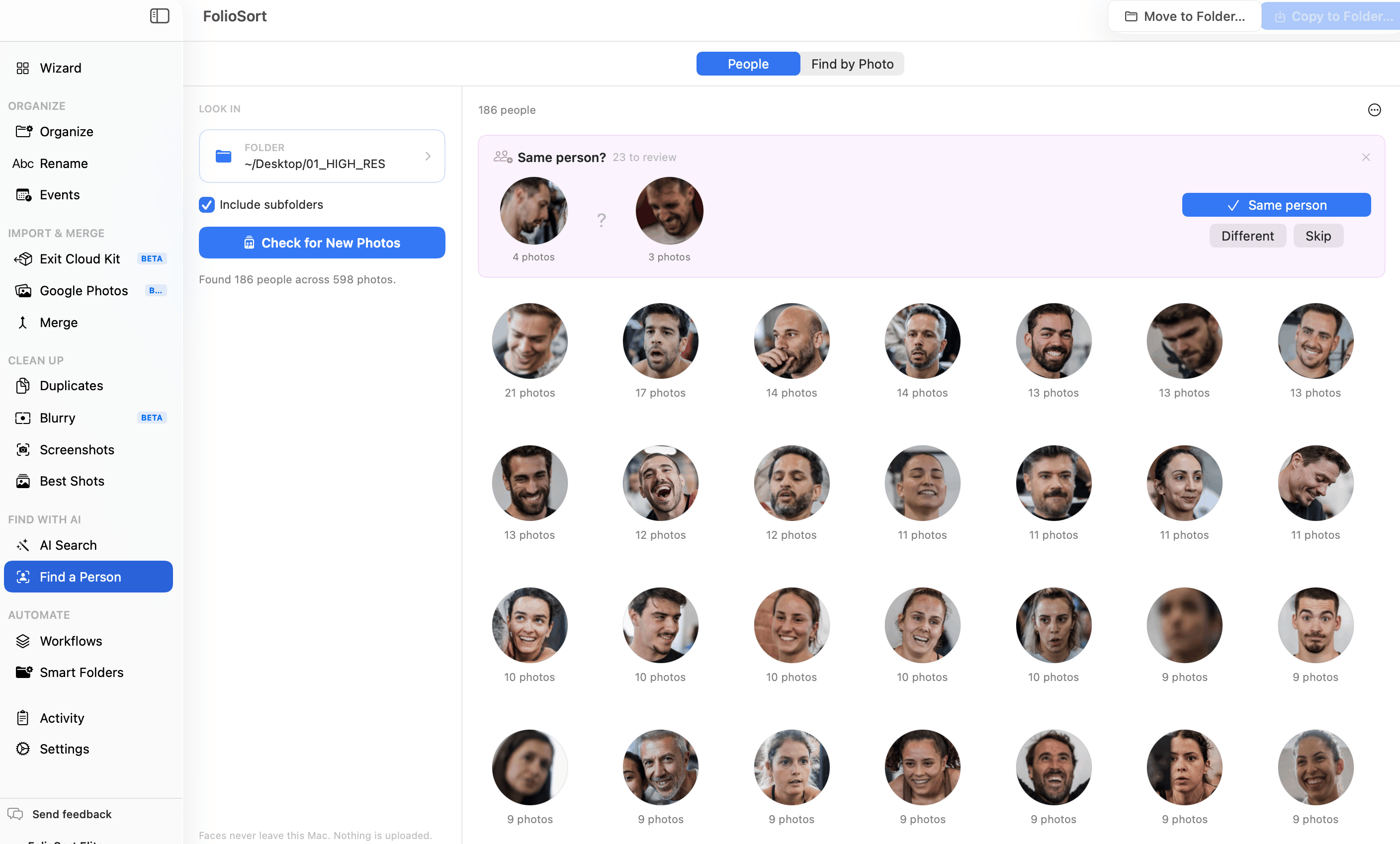
You have thirty thousand photos and no idea how many of them are of your daughter. FolioSort reads a folder and groups the faces it finds into people — no example photo, no tagging, no upload. Open anyone to see only their photos.
Every tool that finds people in photos asks you to start with a photo of that person. That is fine when you are hunting for one specific face. It is useless for the question people actually have about their own archive: who is in here?
So the archive stays anonymous. You know there are pictures of your grandmother somewhere in the folder from 2009, but finding them means scrolling. Photos of your son as a toddler are mixed in with ten years of everything else, and the only way to gather them is by hand.
Point it at a folder. It finds every face, works out which ones belong to the same person, and shows you a grid of the people it found — as it goes, not at the end. You did not supply a single example.
From there it behaves like you would expect: give someone a name, open them to see only their photos, and copy or move that set anywhere. If one person came out as two piles, tell it they are the same and it remembers.
All of it runs on your own machine. The face models ship inside the app; there is no account and nothing is sent anywhere.
How it works
FolioSort reads each photo once — including RAW and HEIC — and finds the faces in it. Progress is live, and people start appearing before the scan finishes.
Faces that belong to the same person are grouped together, largest first. Nobody is asked to set a threshold or understand a percentage.
Give a person a name. If someone came out as two piles, use Same as… to join them. If a photo landed on the wrong person, say so and it moves.
Open a person to see only their photos and copy or move that set — or split the whole library into one folder per person in a single run. Or write their names into XMP sidecars for Capture One and Lightroom.
Once someone has a name

One run, one folder each
Naming people is the work; a folder each is usually the point. Tick the people you want — not necessarily all of them — and FolioSort builds a folder for each and files their photos into it, in one run, with one undo.
Several people who belong together can share a folder: put the three children under Kids and
they land there instead of in three folders you would then have to merge by hand.
The awkward case is the photo with four of your people in it. Copy puts it in all four folders. Move can only put it in one, so it goes to whoever's face is largest in that frame — the person the photograph is actually of.
You see the plan before anything moves: how many folders, how many photos, how many of them are shared, and how many files the run will really write. If Move leaves somebody with no folder at all — because every photo they are in belongs to someone whose face is bigger — the sheet says so, instead of quietly turning "3 people" into "2 folders".
Built to be trusted
Measured, not estimated
FolioSort will group a sample of your photos for free, so you can see the actual people it finds in your actual library — open them, browse their photos, and judge it for yourself. Scanning a whole library is part of Elite.
The sample is not wasted work either: those photos are already analysed, so if you do upgrade, the full scan starts from where the sample left off.
People answers “who is in here?”. These answer the other questions your archive raises.
Already have a photo of someone? Point at it and find every other photo of them.
Find by photo → Next stepWrite the names you gave into XMP sidecars so your cataloguer can search them.
XMP sidecars → RelatedSearch your library by what is in the picture, not by file name.
AI search →Questions
No. That is the difference between this and Find by Photo. People looks at a folder and works out who is in it on its own — you pick a folder, it shows you the faces it grouped. Find by Photo is for when you already have a photo of the person and want the rest.
No. Detection and recognition both run on your own machine, with models bundled inside the app. There is no account, no server call, and no photo or face ever leaves your computer.
Because grouping is set to split rather than risk mixing two people. A pile with a stranger in it destroys your trust in the whole feature; a person split in two costs you one click. When two piles are close, FolioSort asks you directly — it shows both faces and asks whether they are the same person.
Nothing. Names and merges are attached to the individual faces, not to the groups, so re-scanning, adding photos or changing anything about how grouping works can never move a name onto the wrong person.
No. Every photo is remembered by size and modification date, so a second run only reads what is new or changed. Photos with nobody in them are remembered too, so they are never re-examined.
Open them to see only their photos, then copy or move that set wherever you want — with the same confirmation, activity log and undo as everywhere else in FolioSort. You can also split the whole library into one folder per person in a single run, choosing who is included and grouping several people into one folder if you want; a photo with several of them in it is copied into each folder, or, on Move, filed under whoever’s face is largest. And you can write their names into XMP sidecars so Capture One and Lightroom can search for them.
You can try it free on a sample of your photos, which finds real people you can open and browse. Scanning a whole library is part of Elite.
Download FolioSort, point People at a folder, and watch the faces group themselves. Free to try on a sample, no account, and nothing leaves your machine.