BETA · New tools, still being finished
FolioSort Labs
Labs is where new FolioSort tools arrive before they are finished — six of them in FolioSort 5: Resize & Shrink, Bulk Crop, Combine Photos, Reminder Photos, Moved Files Map and Ask Your AI. Each one is marked BETA, each one says what it does to your files, and the image tools write new copies while your originals stay as they are. Tell us which ones should stay.
In FolioSort 5
Every card in the app carries the same line you see here, so you know before you open a lab whether it writes anything.
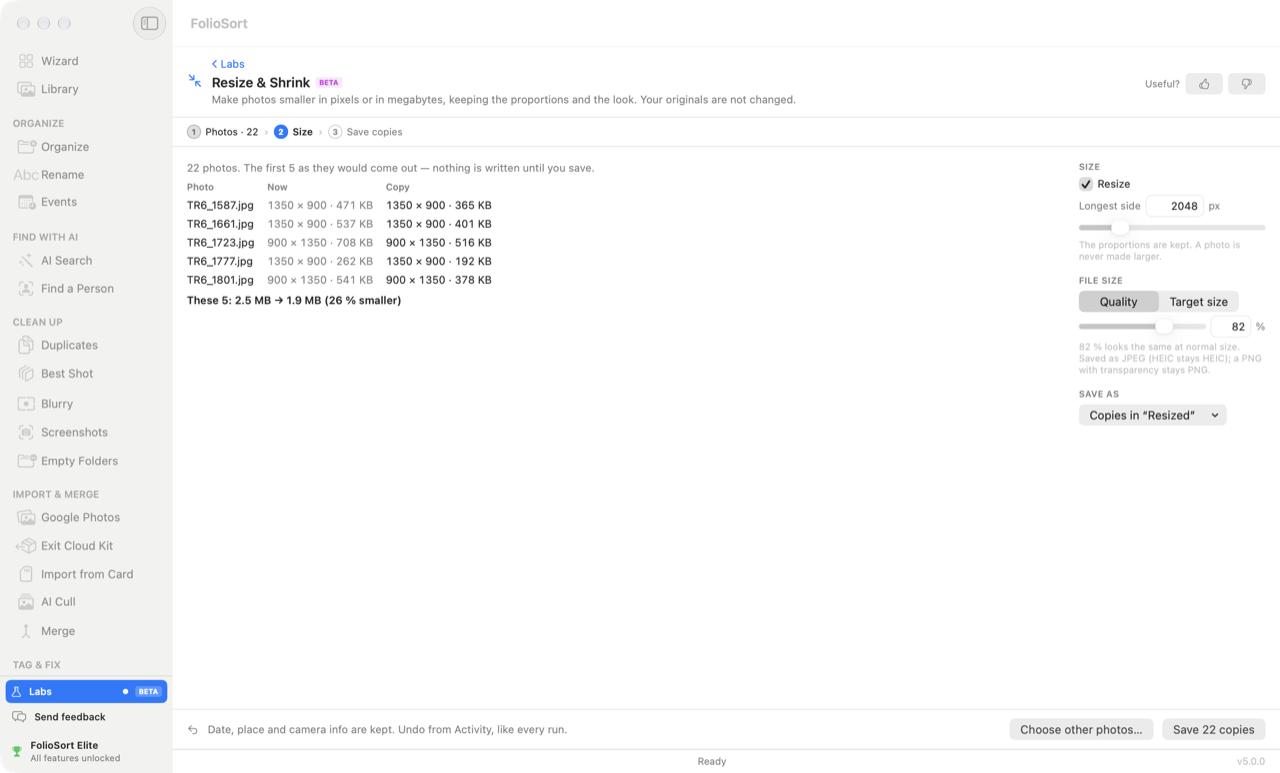
Make photos smaller in pixels or in megabytes, keeping the proportions and the look.
Writes new copies · originals untouched · Pro
How it works ↓ BETASet one crop and apply it to every photo of the same size.
Writes new copies · originals untouched · Pro
How it works ↓ BETAPut several photos or screenshots into one image, a PDF or a contact sheet.
Writes one new file · originals untouched · Pro
How it works ↓ BETAFind the photos you took to remember something — notes, receipts, signs, shop windows.
Moves to Trash only after review · Elite
How it works ↓ BETAWhere each moved photo went, for Lightroom or any catalog that lost track.
Reads only · saves a list · Free
How it works ↓ BETALet Claude, ChatGPT (Codex) and other AI apps on your computer search your photos through FolioSort. Read-only — the images never leave your computer.
Reads only · changes nothing · Free
How it works ↓A small tool you keep wishing FolioSort had. The Suggest a lab card in the app sends it to us.
How every lab works
Open Labs at the bottom of the sidebar, pick a lab, and choose the photos or the folder it works on.
Each lab keeps to a handful of options on one screen — a size, a layout, how sure to be.
The first results appear as they would come out. Nothing is written until you save.
New files go into their own folder next to the originals — Resized, Cropped, Combined. Undo from Activity, like every run.
Lab · Pro · BETA
Smaller copies for an email, a web form with a size limit, or a phone — in pixels or in megabytes, keeping the proportions and the look.
In pixels: set the longest side; the proportions are kept and a photo is never made larger. In megabytes: choose a quality, or a target size in KB or MB and FolioSort finds the highest quality that fits.
A table shows the first five photos now and as the copy, with how much smaller they get, before anything is written. Copies go into a Resized folder next to the originals, or one you choose. Date, place and camera info are kept, and your originals are not changed.
Lab · Pro · BETA
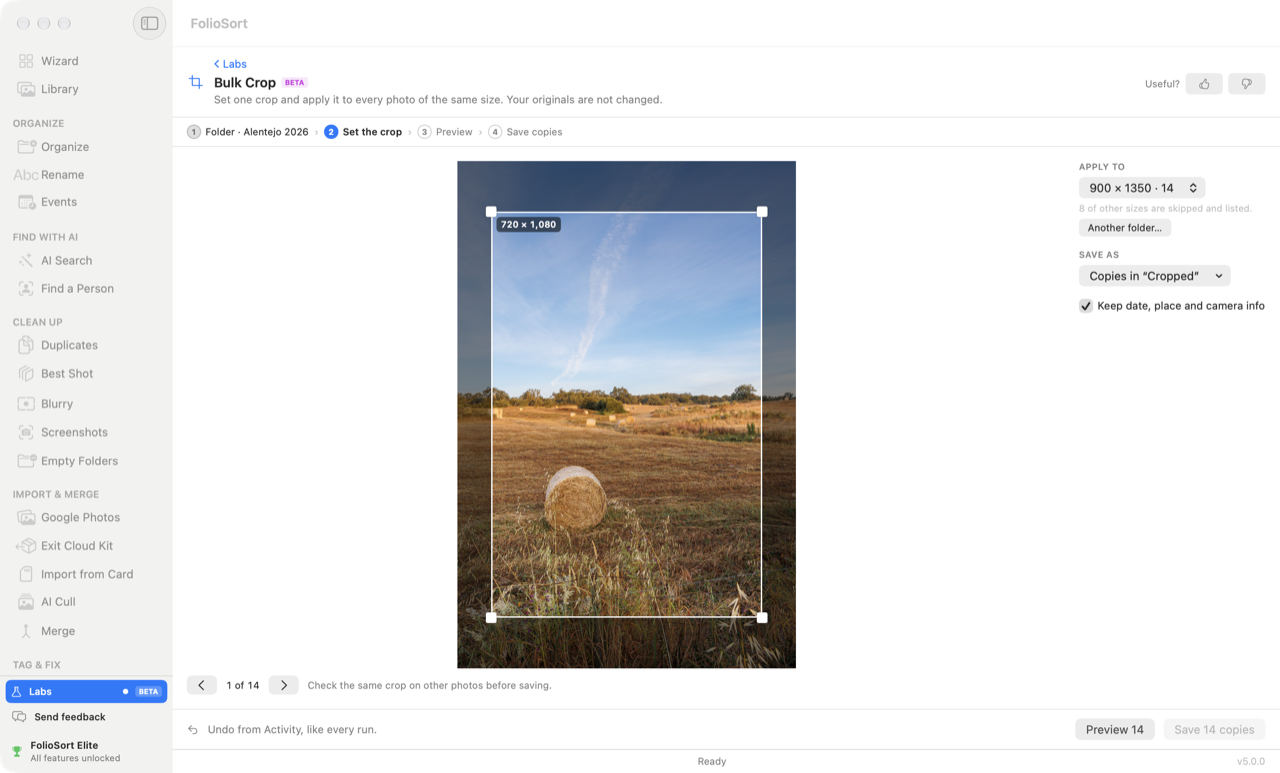
A folder of screenshots with the same status bar, scans with the same white border, frames from the same camera — set the crop once and every photo of that size gets a cropped copy.
Choose a folder and the photos are grouped by size. Drag the crop on one of them, then step through others to check the same crop fits before saving. Photos of other sizes are skipped and listed.
Copies go into a Cropped folder next to the originals, or one you choose. Keep date, place and camera info is on, and your originals are not changed.
Lab · Pro · BETA
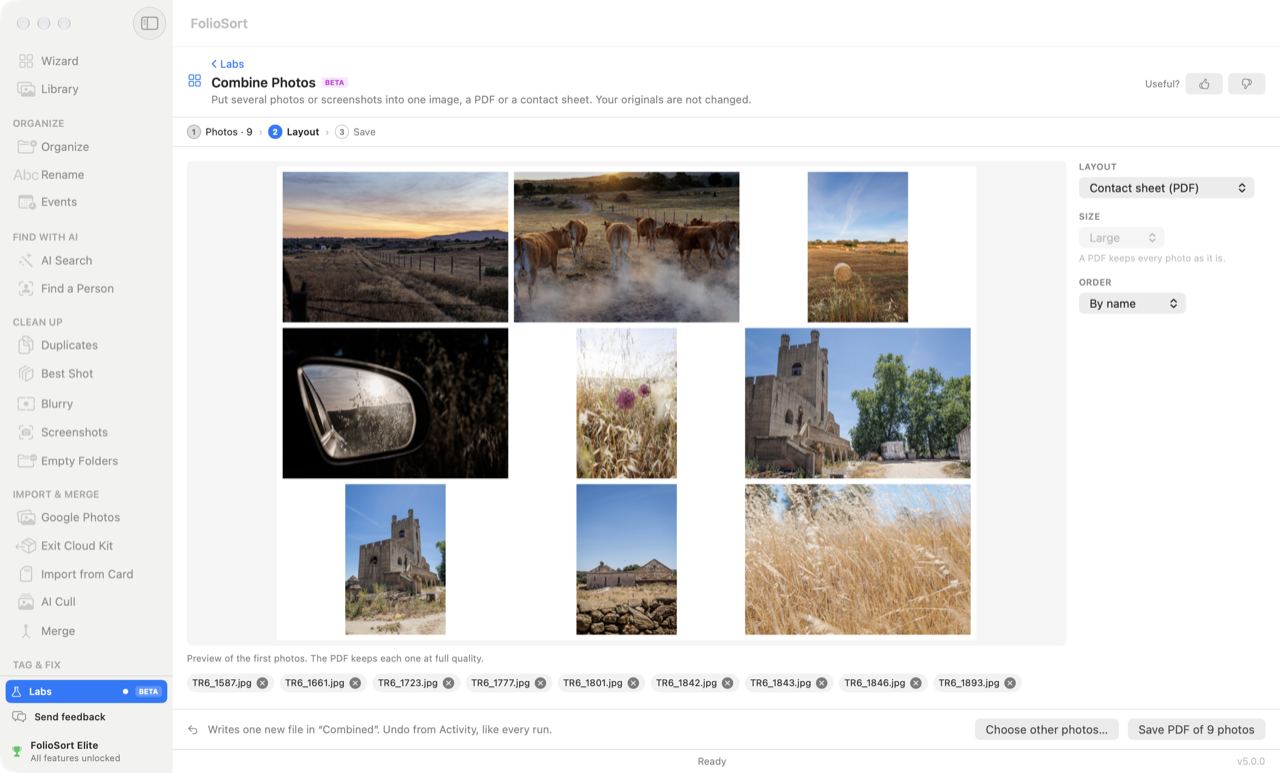
Several photos or screenshots in one file: to send a set in one message, keep a receipt trail in one PDF, or print a contact sheet of a shoot.
Five layouts: One tall image, Side by side, Grid, PDF, one photo per page and Contact sheet (PDF) — an A4 page of thumbnails with their names, a title line and page numbers. Choose the size and the order (by name, oldest first or newest first).
The image layouts take up to 300 photos; the PDFs up to 2,000, each photo kept at full quality. The result is one new file in a Combined folder; your originals are not changed.
Lab · Elite · BETA
The parking-level sign, the receipt for the warranty, the menu, the whiteboard after the meeting. Photos you took to remember something, sitting between the ones you took to keep.
Reminder Photos reads what AI Search already found in your indexed photos and groups the likely reminders: Notes and documents, Receipts and tickets, Signs, posters and shop windows, Photos of screens and QR codes, Maps, menus and calendars. Pick how sure it should be — Strict, Balanced or Generous.
On the Mac, photos with people in them are left out — they look like memories, not reminders. You review the rest, untick any you want to keep, and only then Move N to Trash. Undo puts them back where they were.
Lab · Free · BETA
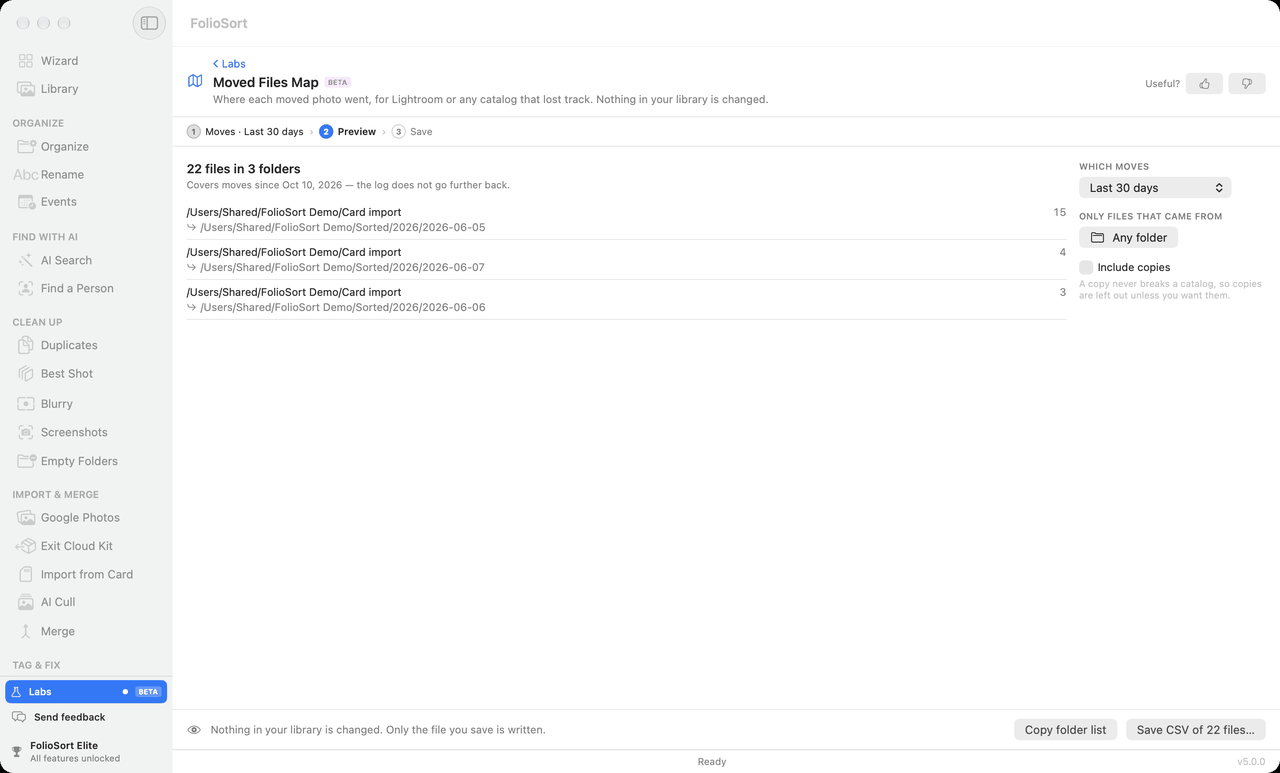
You organized a folder with FolioSort, and now Lightroom — or any catalog that tracks files by path — shows the photos as missing. The map tells you where each one went.
It reads FolioSort's activity log and lists every file that was moved: old place, new place, when, and whether it is still there. Narrow it to the last 24 hours, the last 30 days or everything in the log, and to files that came from one folder. Copies are left out unless you want them — a copy never breaks a catalog.
Save CSV… for a spreadsheet, or Copy folder list for the folder-to-folder moves. Nothing in your library is changed; only the file you save is written. Free, with no limit.
Lab · Free · BETA
"How many photos did I take in 2019?" "Find photos of Maria." "Which photo has the wifi password?" On your Mac or PC, an AI assistant you already use can answer from your own library, through FolioSort.
Turn on Let AI assistants on this Mac search my FolioSort library (this PC on Windows), then Connect to Claude Desktop — or copy the setup for another app. It works with Claude Desktop, the ChatGPT desktop app's Codex, Codex CLI, Cursor, VS Code and any app that runs local MCP servers. A regular ChatGPT chat only connects to servers on the internet, so it cannot reach FolioSort on your computer.
It is read-only: an assistant can search and read details, and can never move, rename, change or delete a file. FolioSort answers from the index it already keeps on your computer, so what the assistant receives is the answer in words. It never receives the images themselves. Free.
What Claude and ChatGPT can ask FolioSort, and how to connect them →
The rules every lab follows
Why it's safe
Which plan each lab needs
| Moved Files Map | Free, with no limit. |
|---|---|
| Ask Your AI | Free. Mac and Windows. |
| Resize & Shrink | Pro. Without Pro, a run saves 100 copies — the button says "Save 100 of N" before you start. |
| Bulk Crop | Pro. Without Pro, a run saves 100 cropped copies. |
| Combine Photos | Pro. Without Pro, one image or PDF takes the first 100 photos. |
| Reminder Photos | Elite. Without Elite, a run moves 100 photos to the Trash. |
One-time licences, no subscription, no account — and FolioSort 5 is a free update for everyone who bought Pro or Elite. See the plans.
The bigger tools in FolioSort 5 that the labs sit next to.
Every photo on every drive you own, even the drive in the drawer.
See the Library → CullPick the keepers from a shoot with keep, reject and stars — the AI helps, you decide.
See AI Cull → Clean upNear-identical shots grouped, the best one marked with a reason, the rest ready for the Trash.
See Best Shot →FAQ
The lab works and is safe to use on your photos, but it is new and may change. Each lab has a Useful? thumbs-up / thumbs-down, and Suggest a lab sends us an idea from inside the app. A lab that grows up moves to its own place in FolioSort, and its Labs card says where it went for one release.
No. Resize & Shrink and Bulk Crop write new copies, Combine Photos writes one new file, and Moved Files Map only reads and saves a list. Reminder Photos moves photos to the Trash (the Recycle Bin on Windows) only after you review them, and Undo puts them back. Every run that writes or moves a file can be undone from Activity.
Moved Files Map is free with no limit. Resize & Shrink, Bulk Crop and Combine Photos are Pro; without Pro a run does 100 photos, and the button says so before it starts. Reminder Photos is Elite; without Elite a run moves 100. You see every preview before you decide.
Yes, all six. Resize & Shrink, Bulk Crop, Combine Photos, Reminder Photos, Moved Files Map and Ask Your AI are in FolioSort for Mac and for Windows, in the Labs row at the bottom of the sidebar.
No. It reads what FolioSort's AI Search index already found when the photos were indexed, on your computer. If a folder is not indexed yet, the lab says so and offers to open AI Search.
Download FolioSort, open Labs at the bottom of the sidebar, and run any lab on your own photos. Your originals stay as they are.