Edit metadata · Tag & Fix
FolioSort's Edit metadata reads the title, caption, author, copyright, keywords and rating of every photo you select and shows each value with how many photos share it. Change them for all of those photos at once, check every change as Now → After, and write them into the files as standard XMP, IPTC and EXIF — with one Undo for the whole write. On your Mac or PC, nothing uploaded.
A copyright line missing from years of work. A caption that belongs on a whole shoot. The same keyword spelt three ways across three trips. An editor that opens one file at a time turns each of those into an afternoon — and a batch tool that writes blind can't show you what a folder actually carries before it changes it.
It gets worse inside the file. The same caption or keyword can live in XMP, in IPTC and in EXIF, and when those copies disagree, two apps show you two different answers about the same photo.
Select photos and FolioSort reads them into one panel: every keyword with its count (“Beach 64/212”), titles and captions (“Mixed — 3 different titles”), author and copyright, rating and colour label, the date range and the places. Chips filter the photos down to the ones with No keywords, No place, No date or No author, so you can fill the gaps first — and an edit applies to exactly the photos shown.
Type a caption, add a keyword or strike one out, set the stars: each change turns orange and stays pending. The bar at the bottom says how many changes on how many photos, and Nothing is written yet, until you press Review & write….
Where a file's keyword lists disagree, FolioSort says so — and writing makes them agree.
How it works
Select photos in the Library and choose Edit metadata… — or right-click a photo. Or open Tag & Fix › Edit metadata and Choose a folder….
Each field shows what the photos carry and on how many. Filter to the ones that have none, then edit. Author and copyright remember your recent values.
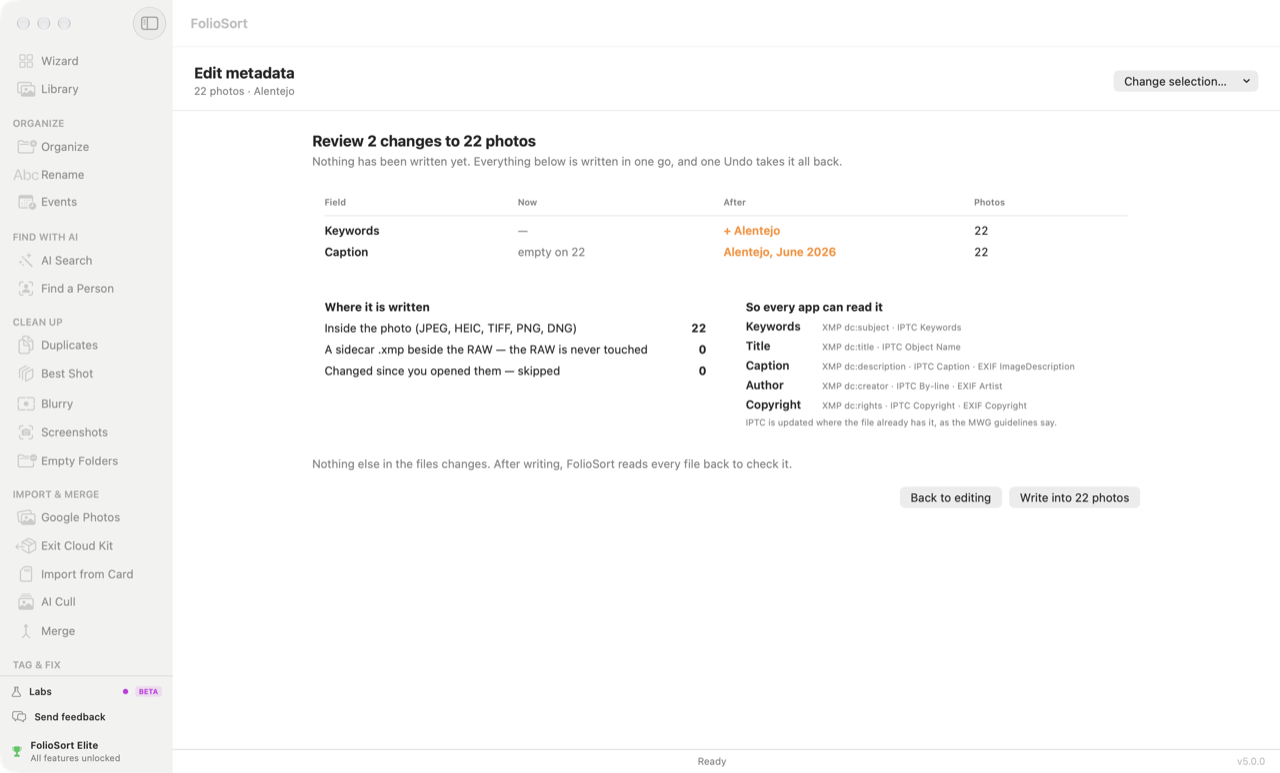
Review & write… lists every change: the field, what it says now, what it will say after, on how many photos — and whether each goes inside the file or into a sidecar.
Write into N photos writes it all in one go, reads every file back to check it, and leaves a single Undo — on the result screen and later in Activity.
What a write does
So every app can read it
Keywords — XMP dc:subject and, for JPEG and TIFF, IPTC Keywords,
with Lightroom's keyword hierarchy kept in step.
Title — XMP dc:title and IPTC Object Name.
Caption — XMP dc:description, IPTC Caption,
EXIF ImageDescription.
Author — XMP dc:creator, IPTC By-line, EXIF Artist.
Copyright — XMP dc:rights, IPTC Copyright,
EXIF Copyright.
Rating and colour label — XMP Rating and XMP Label.
IPTC is updated where the file already has it, as the Metadata Working Group guidelines say. JPEG, HEIC,
PNG, TIFF and DNG get it all inside the file; any other RAW gets an .xmp sidecar beside it.
Nothing else in the file changes.
In our own tests, Lightroom Classic showed all seven fields — title, caption, author,
copyright, keywords, rating and colour label — both from a JPEG and from a Canon CR3's .xmp
sidecar. Windows Explorer's Details tab shows the title, authors, copyright, tags and rating.
Apple Photos shows the title, caption and keywords of a JPEG, but it ignores the
.xmp sidecar of a RAW and has no fields for author, copyright or stars.
For the tags the panel doesn't show, All tags (EXIF · IPTC · XMP) lists every tag of a photo, searchable. Standard tags can be edited there; maker notes stay read-only, because rewriting them can break the camera maker's own software.
Suggestions, never surprises. FolioSort can suggest a missing date from the file name, a place name for photos with GPS, and — with Elite — keywords from AI Tags. They appear dashed; Tab accepts one, Esc dismisses it, and an accepted suggestion still goes through Review.
Why it's safe
.xmp sidecar. Videos are shown but not changed in this release.Reading your photos, the counts, the filters and the All tags view are free, on any number of photos. Free writes 100 photos at a time; Pro writes any number in one go. Keyword suggestions taken from the photos themselves come with Elite. Both are one-time purchases, with no subscription and no account — see pricing. FolioSort 5 is a free update for everyone who bought Pro or Elite.
Edit metadata handles the fields you type. These fill in the ones a computer can work out.
Keywords proposed by the on-device AI, reviewed as cards of photos, written into the files.
AI Tags → DatesFill missing dates, shift a camera whose clock was wrong, or set a date for scans — seen before it's fixed.
Fix dates → PlacesCity, region and country written into your photos, after you review them on a map.
Places →FAQ
Title, caption, author, copyright, keywords, star rating and colour label, for every photo you select at once. The date and the place link to the Dates and Places screens, the camera is shown read-only, and the All tags view lets you edit any standard EXIF, IPTC or XMP tag of one photo, with maker notes kept read-only.
Keywords go into XMP dc:subject and, for JPEG and TIFF, IPTC Keywords, with Lightroom's keyword hierarchy kept in step. Title goes into XMP dc:title and IPTC Object Name; caption into XMP dc:description, IPTC Caption and EXIF ImageDescription; author into XMP dc:creator, IPTC By-line and EXIF Artist; copyright into XMP dc:rights, IPTC Copyright and EXIF Copyright. Rating and colour label go into XMP. IPTC is updated where the file already has it, as the Metadata Working Group guidelines say.
No. For a RAW file, everything goes into an .xmp sidecar beside it, which Lightroom reads, and the RAW itself is never written. JPEG, HEIC, PNG, TIFF and DNG get the metadata inside the file.
Not in this release. Videos in a selection are shown and counted, but never changed; the review screen lists them separately.
Yes. The whole write is one batch with one Undo, on the result screen and later in Activity. Undo puts back what each field said before. A photo that another app changed after the write is left as it is and counted in the result.
Reading your photos, the counts, the filters and the All tags view are free. Free writes 100 photos at a time; Pro writes any number in one go. Keyword suggestions taken from the photos themselves come with Elite. Prices are on the pricing page.
Download FolioSort, select a shoot, and see every title, caption, keyword and copyright line it carries before you change a thing.