Dates
FolioSort Dates fills in missing dates from the file name, the folder name or the photos around it, shifts a batch for a camera whose clock was wrong, and sets a date — even just a year, for scanned prints. Each photo is shown with its old and new date before anything changes, an existing date is never overwritten when filling, and every run can be undone.
You left Google Photos and the export came out with half its dates in .json files, and some
of those went missing. WhatsApp stripped the date out of every image. Scans and downloads read as the day
you copied them. A camera spent a whole trip an hour off, and an old one that was never set says
1 January 1980.
So the timeline puts a wedding next to last week's screenshots, every "sort by date" files them in the wrong year, and fixing them one by one in a metadata editor is a weekend you'll never have.
Point Dates at a folder — or start from the Library's photos without a date — and it reads every capture date, then tells you how many files have none, how many it can date from their names, how many only approximately, and how many look suspicious.
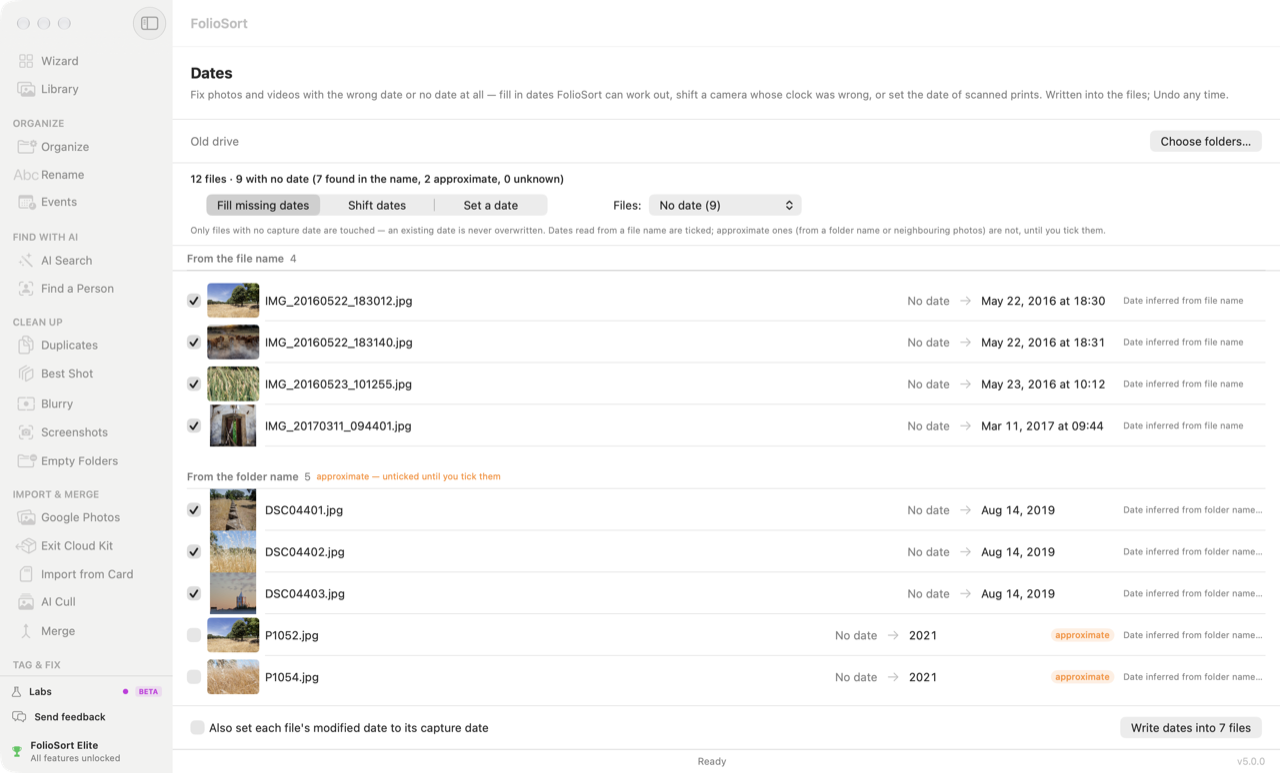
Pick one of three jobs: Fill missing dates, Shift dates or Set a date. Each file is listed with its thumbnail, the date it has, and the date it will get. Untick anything you're not sure of, then write.
Coming from Google Takeout? Run the Takeout import
first — it reads Google's .json files and writes the real dates back, free. Dates is for what
is left. The full move is in the Google Photos
migration guide.
How it works
Choose folders, or the Library's "without a date" photos. Dates reads every photo and video: "N files · N with no date (N found in the name, N approximate, N unknown) · N suspicious".
Fill missing dates, Shift dates or Set a date — on all files, the ones with no date, the suspicious ones, or one camera's.
Every file with its thumbnail and both dates, grouped by where the new date comes from. Approximate ones are unticked until you tick them.
"Write dates into N files". Then Undo, Re-organize by the new dates… to refile them, or see them in the Library.
At a glance
Fill missing dates
Only files with no capture date are touched — an existing date is never overwritten. For each one, FolioSort tries three sources in order, and the review is grouped by them:
From the file name. A stamp such as IMG_20190814_123456 or
2019-08-14 12.34.56 gives the exact time; a WhatsApp name like
IMG-20190814-WA0001 gives the day. These are ticked.
From the folder name. 2003-07 Algarve gives July 2003; 1994 or
Verão 98 gives the year; 2003-07-15 trip gives the day. It looks up to two folders
up, so 1994/Album 2 still counts.
From the photos around it in the same folder. When a folder has at least four dated photos and most of them — 70% — fall within about three months, an undated photo gets the middle of that stretch.
A month or year from a folder name, and every estimate from the photos around it, is marked approximate and starts unticked. A file nothing can date stays "unknown" — use Set a date if you know it.
Shift dates · Set a date
Shift dates moves every selected file by the same amount — years, days, hours and minutes. Pick one camera in the Files list and only its photos move. If you know when one photo was really taken, give FolioSort that time and it works out the shift for the rest; on the Mac, right-click the photo and choose Use as reference…. Camera photos placed from your phone in Places come with their clock difference already measured — Also fix these dates opens Dates with it filled in.
Set a date gives the selected files one date, known to the exact time,
day, month or year. A year is written as 1 July at noon and marked as year-only; a month as the 15th at
noon, marked as month-only. XMP keeps just what you know — 1994, not a made-up day.
Suspicious dates — 1 January 1970 or 1980, 1 January 2000 at midnight, or a date in the future — are what a camera writes when its clock was never set. Dates lists them on their own, so you can set or shift them; filling never touches them. On the Mac, the Library also files them under Without a date, so your timeline no longer starts in 1980.
What goes into the file
Photos — JPEG, HEIC, TIFF, PNG, WebP and DNG — get EXIF DateTimeOriginal,
CreateDate and ModifyDate, plus XMP DateTimeOriginal and
DateCreated.
RAW files get an .xmp sidecar with the date; the RAW itself is not
modified.
Videos get their QuickTime creation and modification dates and the Keys creation date.
Finder and Explorer show when a file was copied, not when the photo was taken. Tick Also set each file's modified date to its capture date and they show the capture date too; leave it off — the default — and the file's modified date is kept as it was.
Each run is one batch in Activity's Changes written into files. Undo puts the previous dates back exactly — and removes a date that was not there before, rather than leaving a blank. A file another app has changed since is left as it is. Dates runs entirely on your computer; nothing is sent anywhere.
Why it's safe
Scanning a folder or your whole Library and reviewing every proposed date are free. The free version writes 100 files per run, and Pro does all of them in one go. Pro is a one-time payment, with no subscription and no account — see pricing. FolioSort 5 is a free update for everyone who bought Pro or Elite.
Dates is one of the Tag & Fix tools. Once the dates are right, the rest falls into place.
Every photo on every drive on one timeline — with a count of the photos still without a date, one click from Dates.
See the Library → Tag & FixGive camera photos without GPS a location from your phone's photos, and write city and country into the files.
See Places → Tag & FixTitles, captions, keywords and copyright for many photos at once, written into the files.
See Edit Metadata →FAQ
Start with FolioSort's Google Takeout import: Google keeps each photo's real date in a .json file beside it, and FolioSort reads it and writes the date back into the photo, free. Dates handles what is left — photos whose .json went missing, WhatsApp images, downloads and scans. It fills in a date from the file name, the folder name or the dated photos around it, and shows each one beside its photo before anything is written.
Because sorting and fixing are two different things. When a photo has no capture date inside it, Organize can work one out from the file name and put the photo in the right folder, but it does not write that date into the file. The next app opens the file, finds no date, and uses the day the file arrived. Run Fill missing dates before you upload: it writes the date into each file, so every app reads the same one.
Not when filling in missing dates: Fill missing dates only touches files that have no capture date, and an existing date is never overwritten. Changing a date that is already there is a separate, deliberate step — Shift dates or Set a date — on the files you select, and it can be undone.
Choose Shift dates, pick that camera in the Files list, and enter the difference in years, days, hours and minutes. If you know when one photo was really taken, tell FolioSort that one time (on the Mac, right-click the photo and choose Use as reference…) and it works out the shift for every selected file. You see each old and new date side by side before you write.
Yes. Choose Set a date and say it is known to the year. EXIF needs a full date, so the photo gets 1 July at noon, and XMP records only the year ("1994"), so the record says what you actually know. A month is written as the 15th at noon and marked as month-only.
Those are dates a camera writes when its clock was never set. Dates lists them under Suspicious dates, together with 1 January 2000 at midnight and dates in the future, so you can set the right date or shift them. Fill missing dates does not touch them, because they have a date — fixing them is your call.
Photos get EXIF DateTimeOriginal, CreateDate and ModifyDate, plus XMP DateTimeOriginal and DateCreated. RAW files get an .xmp sidecar and the RAW itself is not modified. Videos get their QuickTime creation and modification dates and the Keys creation date. If you tick Also set each file's modified date to its capture date, Finder and Explorer show the capture date too; otherwise the file's modified date is kept as it was.
Every run is one Undo: on the result screen, or later from Activity, which keeps your last 20 metadata writes. Undo puts the previous dates back exactly, and removes a date that was not there before. Scanning and reviewing are free; the free version writes 100 files per run, and Pro does all of them in one go, for a one-time payment with no subscription.
Download FolioSort, open Dates, and see every missing and wrong date in your library — with the fix beside each one — before a single file changes.