Places
FolioSort Places matches your camera's clock to your phone's, places each camera photo between the phone photos taken just before and after it, and shows every proposal on a map before anything is written. Then it writes the city, region and country into your files — for the photos you choose. A photo that already has a location is never changed, and every run can be undone.
On a trip you shoot the good pictures on the camera and the quick ones on the phone. The phone stamps every shot with GPS; most cameras don't, unless they're paired with one. Back home, the phone photos sit on a map and the camera photos — the ones you care about — have no location at all.
And even the photos that do have GPS only carry two numbers. No app can search
38.7166, -9.1399 for "Lisbon" unless the place name is written into the file.
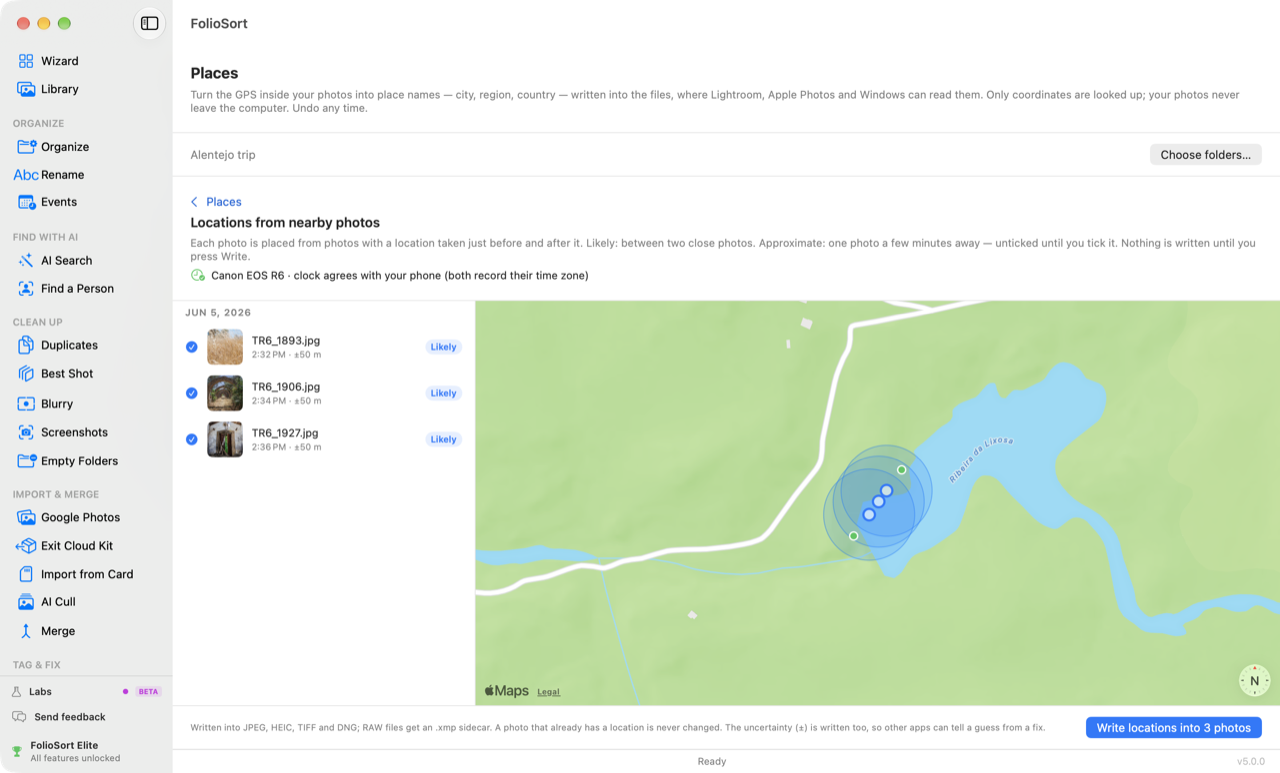
Locations from nearby photos. FolioSort looks at the photos with a location taken just before and after each camera photo, after making the camera's clock agree with the phone's. Each proposal is marked Likely or Approximate, drawn on a map with the photos it came from, and written only when you press Write — with its uncertainty, so other apps can tell a guess from a fix.
Place names. FolioSort turns GPS coordinates into city, region and country, shows each place on a map with its photos, lets you leave out any photo, and writes the names into standard IPTC and XMP place fields inside the files.
Want folders named after places as well? That's
Organize by Location — it files photos into
Country/City folders. Places writes the place into the photo itself; the two work together.
How it works
Choose folders, or start from the Library, which already knows which photos carry GPS. FolioSort counts the photos with GPS and the ones without.
"N photos have no location. N can be placed from the photos around them." Review on the map shows each proposal, Likely or Approximate, with the photos it came from.
Each place appears on a map and in a list with its photos. Click a photo to leave it out of this run; Select none skips a whole place.
"Write place names into N photos" puts them in the files. Undo on the result — or later from Activity — puts back exactly what was there.
The rules, in four numbers
Locations from nearby photos
Likely — the photo sits between two photos with a location, each taken at most 30 minutes from it, and those two were at most 100 m apart. The position is worked out between them by time; the uncertainty is half the distance between them, and never less than ±50 m.
Approximate — only one photo with a location, at most 5 minutes away. The photo takes its position, at ±200 m, and starts unticked: it's written only if you tick it.
No proposal — and the reason is said: "Taken on the move" (the two neighbours imply more than 25 km/h), "The photos around it are far apart", "No photo with a location close enough in time", or "This camera's clock isn't matched to your phone yet". When the photos are in the AI Search index, a photo that doesn't look like the ones it was placed from drops from Likely to Approximate, or is not placed.
The neighbours come from the folders you chose and from every photo with GPS your Library knows.
A camera's clock is often minutes or an hour off — one never moved to summer time is an hour off half the year. FolioSort works out each camera's difference from your phone before it places anything, per outing: photos more than 36 hours apart count as separate sessions.
In order: a clock you set; then time zones, when both camera and phone recorded them; then matching scenes — if the photos are in FolioSort's AI Search index, it finds the same scene in the camera's and the phone's photos and takes the difference, provided at least two matches agree to within two minutes.
If none of those works, the review says the clock isn't matched yet. Set the clock… asks you to pick one camera photo and one phone photo taken at the same moment — or to confirm The clocks agree. The review then reads like "Canon EOS R6 · clock was 1 h 00 min behind your phone", and Also fix these dates opens Dates with that shift filled in. Nothing is written to the dates until you write it there.
What goes into the file
A position from nearby photos is written as EXIF GPS latitude and longitude, plus
GPSHPositioningError — the ± in metres. No altitude is written: unknown is not zero.
Place names go into IPTC:City, Province-State and
Country-PrimaryLocationName, and XMP-photoshop:City, State and
Country — the standard IPTC and XMP place fields.
JPEG, HEIC, TIFF and DNG get them inside the file. RAW files get an .xmp sidecar, and the RAW
itself is not modified. Videos are not written.
To turn a position into a place name, FolioSort sends the coordinates — and nothing else — to Apple's geocoder on the Mac and to OpenStreetMap's Nominatim on Windows. Answers are cached on your computer, so a place already looked up is not asked again. The map loads tiles for the area on screen.
Placing photos from the photos around them is worked out entirely on your computer. No photo, file name or folder name is ever sent.
Every run is one batch in Activity's Changes written into files; the last 20 metadata writes can be undone there, and Undo restores the exact values that were in the file before — including place names you had typed yourself. A photo another app has changed since is left as it is.
Why it's safe
Reviewing is free. The free version names the first 100 photos with GPS per scan — enough to see whether it gets your places right — and Pro names every photo. Placing photos without GPS from the photos around them has no per-run limit. Matching a camera's clock by scene uses the AI Search index, which covers 500 photos on Free and Pro and your whole library with Elite; time zones and Set the clock… work on every plan. Pro and Elite are one-time payments, with no subscription and no account — see pricing. FolioSort 5 is a free update for everyone who bought Pro or Elite.
Places is one of the Tag & Fix tools. The same camera that had no GPS often had the wrong time, too.
Fill in missing dates, shift a camera whose clock was wrong, or set the date of a scanned print.
Fix photo dates → BrowseEvery photo on every drive, on a timeline and a map — with a count of the photos still without a place.
See the Library → Tag & FixKeywords for what is in each photo — beach, castle, dog — written into the files after you review them.
See AI Tags →FAQ
Yes, when you also have photos with a location from around the same time — usually your phone's. FolioSort places a camera photo between two photos with a location taken at most 30 minutes before and after it (Likely), or next to one taken at most 5 minutes away (Approximate). If nothing with a location was taken close enough in time, it says so and proposes nothing. Every proposal is shown on a map first, and nothing is written until you press Write.
It would, so FolioSort matches the camera's clock to your phone's before it places anything. If both recorded their time zone, that settles it. If the photos are in FolioSort's AI Search index, it finds the same scene in the camera's and the phone's photos and works out the difference. Otherwise it asks you: with Set the clock… you pick one camera photo and one phone photo taken at the same moment. The review then shows a line such as "clock was 1 h 00 min behind your phone", and Also fix these dates opens Dates with that shift filled in.
No. FolioSort checks every photo again just before it writes, and a photo that already carries a position is left as it was and counted as "already had a location". Capture dates are never touched by Places either.
A position from nearby photos is written as EXIF GPS latitude and longitude, plus GPSHPositioningError — the uncertainty in metres — so other apps can tell a guess from a fix. No altitude is written. Place names go into IPTC City, Province-State and Country, and XMP City, State and Country. JPEG, HEIC, TIFF and DNG get them inside the file; RAW files get an .xmp sidecar and the RAW itself is not modified. Videos are not written.
They are two separate steps. Sorting into Country/City folders only uses the names for the folders and writes nothing into the files. Writing is its own button, and it says which files it will change: your originals where they are, the copies if you organized with Copy, or the photos you just moved. Before anything is written you see every place that was found with the photos that will get it, and the write can be undone afterwards.
Yes. Organize has a setting for it: leave it on the system default, or pick English, Portuguese, Spanish, French, German, Italian, Dutch, Japanese or Chinese. It matters once names are written into files, because otherwise the same city can end up stored as Munich in one photo and München in another.
Only coordinates, when you ask for place names: to Apple's geocoder on the Mac and to OpenStreetMap's Nominatim on Windows. Answers are cached on your computer, so a place already looked up is not asked again. The map loads tiles for the area on screen. Placing photos from the photos around them is worked out entirely on your computer. No photo, file name or folder name is ever sent.
No — they work together. Places writes the location and the place name into each file, where other apps can read them. Organize by Location moves or copies photos into folders like Country/City using the {City} and {Country} tokens. You can do one, the other, or both.
Reviewing is free. The free version names the first 100 photos with GPS per scan, so you can check that it gets your own towns right; Pro names every photo. Placing photos without GPS from the photos around them has no per-run limit. Pro is a one-time payment, with no subscription and no account.
Download FolioSort, open Places, and see on a map where your camera photos were taken — and what will be written — before a single file changes.