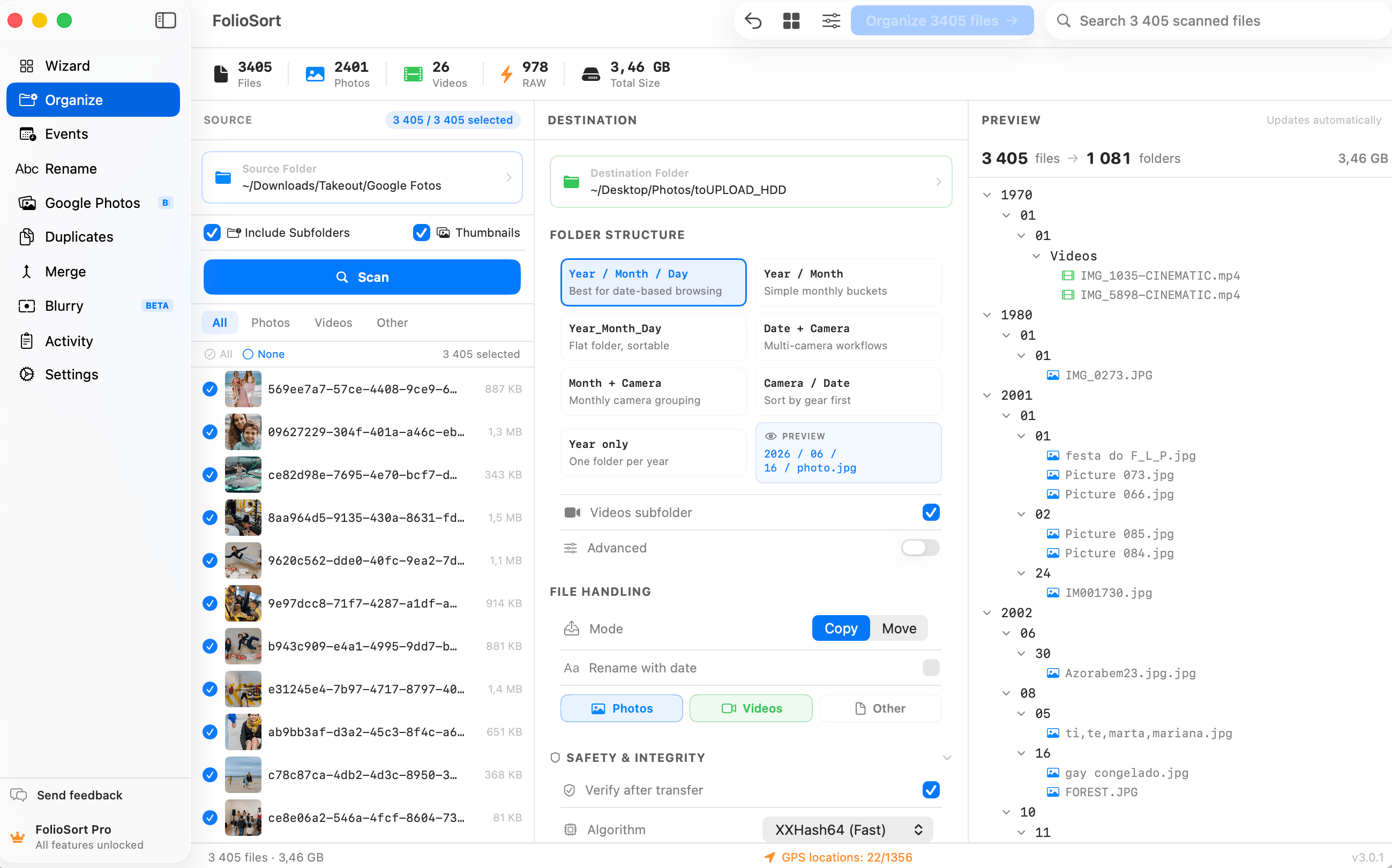
Organize by Date
Not the date your computer last touched the file. FolioSort reads the real
capture date out of every photo and video and files your whole library into clean folders like
2024/07 or 2024/2024-07-13 — thousands at a time, with a preview before anything
moves and one-click undo after.
Every photo carries two completely different dates. The one the camera wrote at the moment of capture, and the one your operating system keeps in the filesystem. They agree right up until the first time you copy the file — and then they never agree again.
Restore from a backup, drag a folder to a new drive, unzip an export, sync through a cloud service: the filesystem date resets to today, on every file at once. That's why a "sort by date" in Finder or File Explorer can put a 2011 wedding and last week's screenshots in the same pile, and why decade-old libraries so often collapse into one folder marked with the day you migrated them.
FolioSort ignores the filesystem date entirely and reads
DateTimeOriginal — the capture timestamp stored in each file's EXIF metadata by
the camera or phone that shot it. That value doesn't change when a file is copied, so it stays right forever.
Drop {YYYY}, {MM} and {DD} into a folder template and your library
rebuilds itself chronologically: real folders on your own disk, in an order that finally matches the order
things actually happened.
It works the same way on photos and videos, including RAW files straight off the card, and everything runs on your own machine — no upload, no account, no catalog.
Date taken vs date modified
DateTimeOriginal)Written once, inside the file, by the camera. Survives copying, backups, drives and operating systems. This is what FolioSort sorts on..json sidecar, not in EXIF. FolioSort reads the sidecar and writes the true date back into the photo before sorting.How it works
Choose the folder, external drive or SD card you want to sort. Subfolders and nested messes are fine.
FolioSort opens every photo and video and reads the EXIF capture date the camera wrote — never the filesystem date.
Combine {YYYY}, {MM} and {DD} — on their own or with {Camera} and {City} — and preview the exact folder tree before anything moves.
Run it. Every file lands in its dated folder, checksum-verified against the original, with one-click undo if you change your mind.
Date tokens
{YYYY}/{MM}The safe default. Readable at any size, and the layout Synology Photos, Immich and most NAS galleries index natively.{YYYY}/{YYYY}-{MM}-{DD}A folder per shooting day, grouped by year — for anyone whose month folders get crowded.{YYYY}/{MM}/{Camera}Date first, then body — the fastest way to untangle a two-camera shoot after the fact.{Country}/{City}/{YYYY}-{MM}-{DD}Place first, date second — the travel archive. GPS is resolved to real place names on-device.2024-07-13_0142.CR3 and sort correctly in any app.You choose copy or move. Copy leaves the source untouched, so you can run the whole thing against a live library and still have the original exactly where it was.
Every file is checksum-verified after it lands — the copy is compared against the original, not merely assumed. Name collisions are resolved instead of overwritten, and the entire batch is reversible with one click of undo.
The output is real folders on disk — readable by Finder, File Explorer, your NAS, Lightroom, Immich and anything else, on any operating system.
No catalog to keep in sync, no proprietary index, no subscription holding your archive hostage. Copy the folders to a new drive and the chronology comes with them. Sorted by date is the one structure that still makes sense in twenty years, whatever software you're using then.
Fifteen years of photos across four hard drives, and every single one said it was created the day I copied it. FolioSort read the actual EXIF dates and rebuilt the whole thing into year and month folders. It's the first time my archive has been in the right order since about 2009.
Date is the backbone of the FolioSort Organizer. Add place from GPS, clean names in bulk, and combine all three into the exact archive you've always wanted.
Batch-sort tens of thousands of photos and videos by EXIF date, camera and custom folder templates.
Explore the Organizer → Pairs withReverse-geocode GPS into city and country folders — on-device, in real folders.
Explore Location →Sort by the real EXIF capture date into year, month and day folders.
This pageFAQ
Date taken is written by the camera into the photo's EXIF metadata at the moment of capture, and it never changes. Date modified is a filesystem timestamp your operating system rewrites whenever the file is copied, moved, restored from a backup or exported — so it usually shows the day you last touched the file, not the day you took the photo. FolioSort sorts by date taken.
Install FolioSort on macOS 14 or later or Windows 10 or later, point it at the folder, drive or SD card you want to sort, choose a folder template such as {YYYY}/{MM}, preview the destination tree, and run it. Every photo and video is filed into a folder named after its real EXIF capture date, copied or moved with checksum verification and one-click undo.
{YYYY}/{MM} — year then month — is the safest default: it stays readable at any library size and it's the layout Synology Photos, Immich and most NAS gallery apps index natively. Use {YYYY}/{YYYY}-{MM}-{DD} if you shoot often enough that a month folder gets crowded, and keep the date first in the path so folders always sort chronologically. There's a longer walkthrough in the best photo folder structure.
Screenshots, scans, downloads and messaging-app images often have no capture date at all. FolioSort first looks for a date in the file name. Failing that, it uses the earlier of the file's created and modified dates, because copying a file resets the first and keeps the second. Photos synced down from iCloud or another cloud can carry the download day in both, so you can also choose to skip files with no date of their own instead of filing them under a guess. Sorting does not write the date into the file; Dates does that.
Google Takeout writes the real capture time into a JSON sidecar next to each image — photoTakenTime.timestamp — rather than into the file's EXIF. Most tools fall back to the file's modified date, which is the export date, so every photo appears as taken today. FolioSort reads the sidecar and writes the real date into DateTimeOriginal in EXIF before sorting.
Yes. Photos and videos are sorted together by their real capture date, so a day's shoot stays in one folder instead of splitting into two archives. RAW formats — Canon CR3, Nikon NEF, Sony ARW, Fujifilm RAF and 20+ more — are read directly, with no conversion and no edit to the original.
Yes, in FolioSort 5. A Live Photo is two files: a picture and a short video with the same name. FolioSort files the video with its picture, by the picture's date, and gives it the same new name if you rename, so the pair is never split across folders. It works for the .MOV from an iPhone and for the .MP4 that Google Takeout exports.
Yes, for up to 100 files per batch — enough to sort a card or test it on a real folder first. Pro removes the limit for a one-time €29.99, with no subscription and a 14-day money-back guarantee.
Yes. Choose the No subfolders preset and every file goes straight into the destination folder, renamed with its date if you turn that on — no year or month folders at all. Two files with the same name are both kept (IMG_0001.JPG and IMG_0001_1.JPG), and Videos in their own folder still makes a single Videos folder if you switch it on. The preset is free.
Point FolioSort at the pile, pick a {YYYY}/{MM} template, and watch years of photos and
videos fall into chronological order — previewed first, checksum-verified, and undoable in one click.