Migration Guide Nextcloud macOS
Google Takeout exports strip real dates and buries GPS in JSON files. Uploading directly to Nextcloud causes thousands of photos to appear as "taken today". FolioSort completely restores your EXIF metadata locally on your Mac before your migration.
FolioSort restores every date and GPS tag and previews your clean Year/Month library before it ever reaches your Nextcloud sync folder.
Nextcloud is a self-hosted collaboration platform — and Nextcloud Photos is a capable gallery built on top of it.
Nextcloud is fully open source under AGPL. You can audit the code, run it yourself, and know exactly what happens to your photos.
Unlike Google Photos, Nextcloud treats photos as regular files in a folder structure. Your EXIF-organized library from FolioSort maps directly to Nextcloud's file system.
Home server, Synology, QNAP, VPS, Raspberry Pi — Nextcloud runs wherever you have Docker or a web server. No monthly fees.
The Nextcloud Desktop app for macOS syncs your organized folder continuously — like Dropbox but completely private and self-hosted.
At takeout.google.com, export Google Photos only. Download all zip parts. Extract into a single local folder on your Mac.
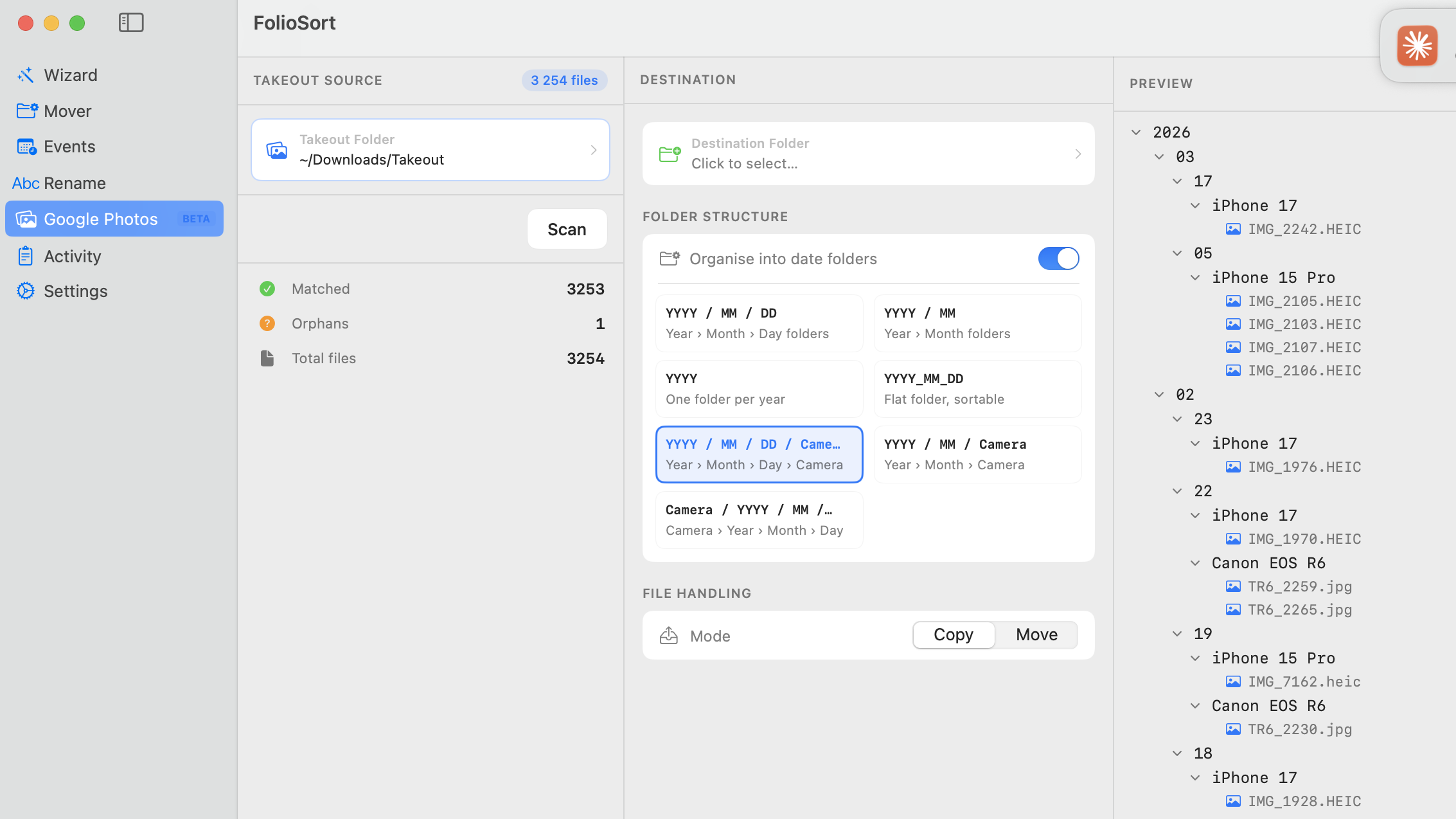
Open FolioSort and select Google Photos (Beta) in the sidebar. Point it at your Takeout folder and click Scan to read the JSON sidecars and write real timestamps and GPS into each image's EXIF. Duplicates are detected by content hash and removed.
In the same panel, set your destination, toggle Organise into date folders and pick a template such as {YYYY}/{MM}/ or {YYYY}/{City}/. Choose Copy or Move and click Process. Your library becomes a clean chronological folder structure ready for Nextcloud.
Download the Nextcloud Desktop client for macOS from nextcloud.com. Connect it to your self-hosted instance. Create a sync folder that maps to your Nextcloud Photos directory.
Move or copy your FolioSort-organized folder into your Nextcloud sync directory. The client uploads everything, maintaining the folder structure that Nextcloud Photos reads for its gallery view.
In your Nextcloud instance, enable the Photos app. It reads EXIF from your uploaded files and builds a timeline with correct dates, a location map view, and album support.
Nextcloud Photos' gallery reads EXIF from files — but its file view also reflects your folder structure. FolioSort creates both perfectly.
Nextcloud Photos' timeline groups by month. A {YYYY}/{MM}/ folder structure from FolioSort means each folder corresponds exactly to a timeline month — making navigation fast.
Nextcloud Maps can display your photos on a world map by GPS. FolioSort restores GPS from Takeout JSON sidecars so every location-tagged photo appears on the map.
Nextcloud doesn't deduplicate. If you upload Takeout files without deduplicating first, every photo will appear twice or three times in the gallery. FolioSort removes duplicates before upload.
FolioSort verifies every file during the local move. You can then upload to Nextcloud knowing your files are intact — no corruption introduced in the FolioSort step.
Immich is purpose-built as a Google Photos replacement with face recognition and memories. Compare with Nextcloud Photos to choose what fits your workflow.
Running Nextcloud on a Synology? This guide covers the SMB transfer workflow and Synology Photos as an alternative to Nextcloud.
Everything you need to know about what Google Takeout breaks and the complete FolioSort workflow to fix it — regardless of your destination.
Migrating Google Photos to Nextcloud, answered.
Export your photos with Google Takeout and extract the .zip files into one folder. Open FolioSort, select Google Photos (Beta) in the sidebar, point it at your Takeout folder and click Scan to restore the real dates and GPS from the JSON sidecars. Then organize everything into clean Year/Month folders and let the Nextcloud Desktop client or a WebDAV mount sync that organized folder to your Nextcloud instance. The full walkthrough is in the steps above.
Takeout stores the real capture date in separate .json sidecar files, not in the photo's EXIF, and extraction stamps every file with today's date. Nextcloud Photos reads EXIF, so without a fix the whole timeline collapses onto today. FolioSort reads those sidecars and writes the correct DateTimeOriginal back into each file before you sync.
Yes. FolioSort is free to download and the free tier processes up to 100 files per operation, so you can test the full workflow end to end. Pro (€14.99, one-time — no subscription) removes the limit for large libraries and adds duplicate detection.
No. FolioSort runs 100% locally on your Mac and never uploads anything itself. It only restores metadata and organizes files on disk. The only thing that reaches your Nextcloud server is whatever your own Nextcloud Desktop client or WebDAV mount syncs — under your control, to your own instance.
Yes. Set the destination to any locally-mounted volume, including your Nextcloud Desktop sync folder or a WebDAV mount. FolioSort writes the organized Year/Month structure straight into it, and the Nextcloud client uploads from there.
No. FolioSort uses a copy-then-verify approach: it copies each file to the destination, verifies it with a checksum, and only removes the source if you explicitly choose Move. Your raw Takeout files stay untouched until you've confirmed the organized library is correct.
Yes — FolioSort runs on both macOS 14+ and Windows 10+, with the same Google Photos (Beta) import and folder organization. The Nextcloud Desktop client and WebDAV both work on Windows as well, so every step applies there too.
Download FolioSort free and fix your Google Takeout files before they reach Nextcloud — correct dates, restored GPS, zero duplicates. Then sync your clean Year/Month library to your own instance.